Get certified for free when you join Fabric Data Days 2026 and dive into Fabric, Power BI, SQL, AI, and other essential data skills.
Join nowJuly 28 - August 9 | Final Round of the Power BI Dataviz World Championships. This is your chance. Learn more
I just noticed this visual bug started happening a couple of days ago...
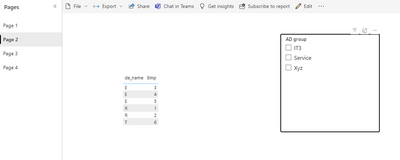
When selecting a report page from the side nav, a very brief black outline appears around all of the pages and then temporarily outlines a Slicer on the page if you have one.
This happens in Chrome and Edge
Solved! Go to Solution.
Hi , @cassidy
I reproduce your bug in Power BI Service. The bug is when I select other page , the bug reproduces: (The “AD group” slicer visual is positioned and has the black border):
For this bug, I have escalated it to the product group as ICM. The ICM ID is : 347527225
If there is any update on this issue, I will let you know here.
Thank you for your support and understanding of Power BI!
Best Regards,
Aniya Zhang
If this post helps, then please consider Accept it as the solution to help the other members find it more quickly
Hi , @cassidy
I reproduce your bug in Power BI Service. The bug is when I select other page , the bug reproduces: (The “AD group” slicer visual is positioned and has the black border):
For this bug, I have escalated it to the product group as ICM. The ICM ID is : 347527225
If there is any update on this issue, I will let you know here.
Thank you for your support and understanding of Power BI!
Best Regards,
Aniya Zhang
If this post helps, then please consider Accept it as the solution to help the other members find it more quickly
Caught it in action on the Page nav:
Hi, @cassidy
I think it is the same as the bug ,it just seems like the Front-end interface focus issues. For this bug , I have escalated to the product group and I will let you know of any updates.
Thank you for your support and understanding of Power BI!
Best Regards,
Aniya Zhang
If this post helps, then please consider Accept it as the solution to help the other members find it more quickly
Thank you @v-yueyunzh-msft , not just the Slicer gets a black border, but the Pages on the left nav very briefly get a black border as well...it's not as bad as the Slicer, but looks bad.
HI @cassidy
Can you confirm you have used the latest version of Power BI Desktop?
Hi @cassidy
I dont see this happening when I try it on a Power BI report.
Could you download and install the latest version of Power BI desktop, upload again and see if the issue is fixed?
Hi @GilbertQ , this happens when creating a Report in Service and viewing it.
I even just created a new report in my workspace to test, same issue occurs.
Join us in Barcelona for FabCon and SQLCon, the Fabric, Power BI, SQL, and AI community event. Save €200 with code FABCMTY200.
If you love stickers, then you will definitely want to check out our community sticker challenge, Barcelona edition!
Check out the July 2026 Power BI update to learn about new features.
| User | Count |
|---|---|
| 14 | |
| 9 | |
| 9 | |
| 6 | |
| 5 |