Don't miss your chance to take the Fabric Data Engineer (DP-600) exam for FREE! Find out how by attending the DP-600 session on April 23rd (pacific time), live or on-demand.
Learn moreNext up in the FabCon + SQLCon recap series: The roadmap for Microsoft SQL and Maximizing Developer experiences in Fabric. All sessions are available on-demand after the live show. Register now
Hi,
We have many developes who creates Power BI reports and publishes on a Workspace.
As an admin I want to find out who has published it. Is there a way to find out who has created it?
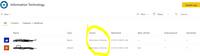
Also, There is a Owner column on Online, it shows workspace name in it. what is the purpose of that column?
Solved! Go to Solution.
Hi @PBInewbie21 ,
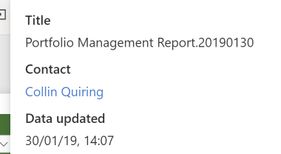
You can see the Owner in the "Contact" information for each report in the top middle of the screen like this:
That is manual and is time consuming, perhaps there is an API that you can use:
https://docs.microsoft.com/en-us/rest/api/power-bi/
Proud to be a Datanaut!
Private message me for consulting or training needs.
hi @PBInewbie21
Another way is that you could see it in auditing logs.
See more details in this same post:
Regards,
Lin
Getting contact information from an embedded report is difficult because the title bar is invisible. I found a workaround in this article here that helped me identify the owner of a report.
let
SourceMaterial = PowerBIRESTAPI.Navigation(),
Admin = SourceMaterial{[Key="Admin"]}[Data],
GroupUsersAsAdmin = Admin{[Key="GroupUsersAsAdmin"]}[Data]
in
GroupUsersAsAdmin
hi @PBInewbie21
Another way is that you could see it in auditing logs.
See more details in this same post:
Regards,
Lin
Hi @PBInewbie21 ,
You can see the Owner in the "Contact" information for each report in the top middle of the screen like this:
That is manual and is time consuming, perhaps there is an API that you can use:
https://docs.microsoft.com/en-us/rest/api/power-bi/
Proud to be a Datanaut!
Private message me for consulting or training needs.
If you have recently started exploring Fabric, we'd love to hear how it's going. Your feedback can help with product improvements.
A new Power BI DataViz World Championship is coming this June! Don't miss out on submitting your entry.
Experience the highlights from FabCon & SQLCon, available live and on-demand starting April 14th.
| User | Count |
|---|---|
| 11 | |
| 10 | |
| 9 | |
| 8 | |
| 8 |