cancel
Showing results for 
Search instead for 
Did you mean: 

Data Days is here! Join us now for 60+ days of learning, challenges, and connection. Learn more

Reply
PBInewbie21
Helper II
Helper II

Report Owner

Hi,

We have many developes who creates Power BI reports and publishes on a Workspace.

As an admin I want to find out who has published it. Is there a way to find out who has created it?


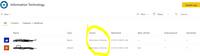
Also, There is a Owner column on Online, it shows workspace name in it. what is the purpose of that column?

Capture.PNG


2 ACCEPTED SOLUTIONS
collinq
Super User
Super User

Hi @PBInewbie21 ,


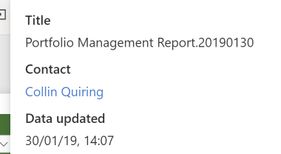
You can see the Owner in the "Contact" information for each report in the top middle of the screen like this:

Owner.jpg


That is manual and is time consuming, perhaps there is an API that you can use:

https://docs.microsoft.com/en-us/rest/api/power-bi/


I would appreciate Kudos if my response was helpful. I would also appreciate it if you would Mark this As a Solution if it solved the problem. Thanks!


Did I answer your question? Mark my post as a solution!

Proud to be a Datanaut!
Private message me for consulting or training needs.


View solution in original post

v-lili6-msft
Community Support
Community Support

hi  @PBInewbie21 

Another way is that you could see it in auditing logs.

See more details in this same post:

https://community.powerbi.com/t5/Service/Identify-the-report-s-creator-in-a-workspace-with-several/t...


Regards,

Lin

Community Support Team _ Lin
If this post helps, then please consider Accept it as the solution to help the other members find it more quickly.

View solution in original post

4 REPLIES 4
WhirpoolX
New Member

Getting contact information from an embedded report is difficult because the title bar is invisible. I found a workaround in this article here that helped me identify the owner of a report.

apo1979prio
Helper I
Helper I

let
SourceMaterial = PowerBIRESTAPI.Navigation(),
Admin = SourceMaterial{[Key="Admin"]}[Data],
GroupUsersAsAdmin = Admin{[Key="GroupUsersAsAdmin"]}[Data]
in
GroupUsersAsAdmin

v-lili6-msft
Community Support
Community Support

hi  @PBInewbie21 

Another way is that you could see it in auditing logs.

See more details in this same post:

https://community.powerbi.com/t5/Service/Identify-the-report-s-creator-in-a-workspace-with-several/t...


Regards,

Lin

Community Support Team _ Lin
If this post helps, then please consider Accept it as the solution to help the other members find it more quickly.
collinq
Super User
Super User

Hi @PBInewbie21 ,


You can see the Owner in the "Contact" information for each report in the top middle of the screen like this:

Owner.jpg


That is manual and is time consuming, perhaps there is an API that you can use:

https://docs.microsoft.com/en-us/rest/api/power-bi/


I would appreciate Kudos if my response was helpful. I would also appreciate it if you would Mark this As a Solution if it solved the problem. Thanks!


Did I answer your question? Mark my post as a solution!

Proud to be a Datanaut!
Private message me for consulting or training needs.


Helpful resources

Announcements
Fabric Data Days is here Carousel

Fabric Data Days 2026

Don't miss out on Data Days, June 15 through August 7. Learn Fabric, Power BI, SQL, AI and more.

May Power BI Update Carousel

Power BI Monthly Update - May 2026

Check out the May 2026 Power BI update to learn about new features.

Power BI DataViz World Championships carousel

Power BI DataViz World Championships - June 2026

A new Power BI DataViz World Championship is coming this June! Don't miss out on submitting your entry.