Get certified for free when you join Fabric Data Days 2026 and dive into Fabric, Power BI, SQL, AI, and other essential data skills.
Join nowData Days is here! Join us now for 60+ days of learning, challenges, and connection. Learn more
Hi,
We have many developes who creates Power BI reports and publishes on a Workspace.
As an admin I want to find out who has published it. Is there a way to find out who has created it?
Also, There is a Owner column on Online, it shows workspace name in it. what is the purpose of that column?
Solved! Go to Solution.
Hi @PBInewbie21 ,
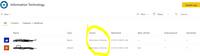
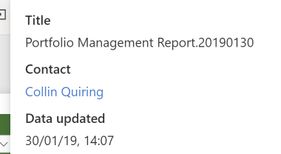
You can see the Owner in the "Contact" information for each report in the top middle of the screen like this:
That is manual and is time consuming, perhaps there is an API that you can use:
https://docs.microsoft.com/en-us/rest/api/power-bi/
Proud to be a Datanaut!
Private message me for consulting or training needs.
hi @PBInewbie21
Another way is that you could see it in auditing logs.
See more details in this same post:
Regards,
Lin
Getting contact information from an embedded report is difficult because the title bar is invisible. I found a workaround in this article here that helped me identify the owner of a report.
let
SourceMaterial = PowerBIRESTAPI.Navigation(),
Admin = SourceMaterial{[Key="Admin"]}[Data],
GroupUsersAsAdmin = Admin{[Key="GroupUsersAsAdmin"]}[Data]
in
GroupUsersAsAdmin
hi @PBInewbie21
Another way is that you could see it in auditing logs.
See more details in this same post:
Regards,
Lin
Hi @PBInewbie21 ,
You can see the Owner in the "Contact" information for each report in the top middle of the screen like this:
That is manual and is time consuming, perhaps there is an API that you can use:
https://docs.microsoft.com/en-us/rest/api/power-bi/
Proud to be a Datanaut!
Private message me for consulting or training needs.
Don't miss out on Data Days, June 15 through August 7. Learn Fabric, Power BI, SQL, AI and more.
Check out the May 2026 Power BI update to learn about new features.
| User | Count |
|---|---|
| 16 | |
| 10 | |
| 10 | |
| 8 | |
| 7 |
| User | Count |
|---|---|
| 40 | |
| 36 | |
| 34 | |
| 28 | |
| 20 |