cancel
Showing results for 
Search instead for 
Did you mean: 

Learn from the best! Meet the four finalists headed to the FINALS of the Power BI Dataviz World Championships! Register now

Reply
BartEdgerton
Advocate I
Advocate I

Remove data source from gateway

How do you remove a data source that is no longer in use from "Manage Gateways"?  I don't find it anywhere else and I have nothing using it anymore.


This is my second try posting this issue on this janky forum.  

1 ACCEPTED SOLUTION
GilbertQ
Super User
Super User

Hi there


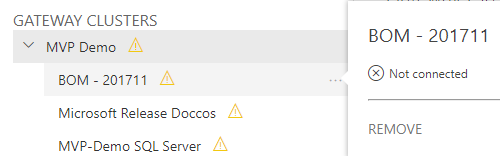
If you hover next to the name of your data source, there will be the three "..." click on that which will bring up a menu and you can select Remove as shown below.image.png


Did I answer your question? Mark my post as a solution!

Proud to be a Super User!


Power BI Blog

View solution in original post

2 REPLIES 2
GilbertQ
Super User
Super User

Hi there


If you hover next to the name of your data source, there will be the three "..." click on that which will bring up a menu and you can select Remove as shown below.image.png


Did I answer your question? Mark my post as a solution!

Proud to be a Super User!


Power BI Blog

You are correct, I didn't realize that, since it takes several seconds of constant hovering to get the dots to appear.


Thank you!

Helpful resources

Announcements
Power BI DataViz World Championships carousel

Power BI DataViz World Championships - June 2026

A new Power BI DataViz World Championship is coming this June! Don't miss out on submitting your entry.

Join our Fabric User Panel

Join our Fabric User Panel

Share feedback directly with Fabric product managers, participate in targeted research studies and influence the Fabric roadmap.

March Power BI Update Carousel

Power BI Community Update - March 2026

Check out the March 2026 Power BI update to learn about new features.

Top Kudoed Authors