
cancel
Showing results for 
Search instead for 
Did you mean: 

The Power BI Data Visualization World Championships is back! Get ahead of the game and start preparing now! Learn more

Reply
setis
Post Partisan
Post Partisan

Refresh fails

Dear all, 


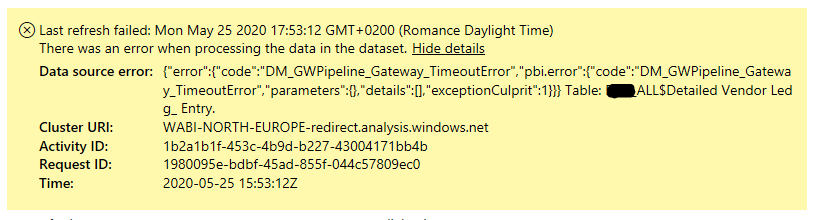
I've been getting the following refresh fails on random tables. 

gateway_error.PNG


On all my tables, i have inserted the following as an attempt to avoid timeout errors but I'm still getting them.

gtw2.PNG


Most of my tables are an "Append Query as new" in which I'm combining 4 tables and I deactivate "Enable load" on the 4 tables. The above code is on the 4 tables but not on the Appended. 


I hope that this makes sense. 


Does anyone have an idea of what the problem is here?


Thanks in advance

4 REPLIES 4
v-yingjl
Community Support
Community Support

Hi @setis ,


If you've fixed the issue on your own please kindly share your solution. If the above posts help, please kindly mark it as a solution to help others find it more quickly. Thanks!


Best Regards,
Yingjie Li

@v-yingjl unfortunately the issue is not fixed. 


The settings you suggested were already in the gateway and I have an open ticket with MS that has received the gateways logs. 


I will update the thread with their findings if there is a solution. 

v-yingjl
Community Support
Community Support

Hi @setis ,

With that said in the DataMovement.Pipeline.Gateway config file you can edit this settings to your desire value to see if this resolves you problem. 

</setting>

<setting name="DbConnectionPoolMaxSize" serializeAs="String">
<value>256</value>
</setting>


If not help, I would recommend you create a support ticket here .


Best Regards,
Yingjie Li

If this post helps then please consider Accept it as the solution to help the other members find it more quickly.

Greg_Deckler
Community Champion
Community Champion

You could check the Issues forum here:

https://community.powerbi.com/t5/Issues/idb-p/Issues

And if it is not there, then you could post it.

If you have Pro account you could try to open a support ticket. If you have a Pro account it is free. Go to https://support.powerbi.com. Scroll down and click "CREATE SUPPORT TICKET".


Follow on LinkedIn
@ me in replies or I'll lose your thread!!!
Instead of a Kudo, please vote for this idea
Become an expert!: Enterprise DNA
External Tools: MSHGQM
YouTube Channel!: Microsoft Hates Greg
Latest book!:
DAX For Humans

DAX is easy, CALCULATE makes DAX hard...

Helpful resources

Announcements
Power BI DataViz World Championships

Power BI Dataviz World Championships

The Power BI Data Visualization World Championships is back! Get ahead of the game and start preparing now!

December 2025 Power BI Update Carousel

Power BI Monthly Update - December 2025

Check out the December 2025 Power BI Holiday Recap!

FabCon Atlanta 2026 carousel

FabCon Atlanta 2026

Join us at FabCon Atlanta, March 16-20, for the ultimate Fabric, Power BI, AI and SQL community-led event. Save $200 with code FABCOMM.