cancel
Showing results for 
Search instead for 
Did you mean: 

Learn from the best! Meet the four finalists headed to the FINALS of the Power BI Dataviz World Championships! Register now

Reply
cherif22
Frequent Visitor

Refresh dashboard automatically

hello community 

I have a mySQL database that I can connect to, and i was publish my rapport in power bi service but i dont know how i can make rapport take update automatique from MySQL database help me Smiley Sad

2 ACCEPTED SOLUTIONS
Anonymous
Not applicable

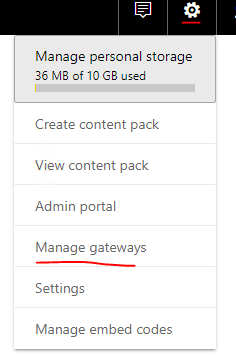
@cherif22 In order to refresh data from on premises sources you need to set up a gateway. If these are personal reports, just install the personal gateway, if they are for your company, find a server and install it there. https://powerbi.microsoft.com/en-us/gateway/ Once you have installed the gateway, in the Power BI Service, you can schedule a refresh on the dataset if you have a personal gateway. If you used the Enterprise gateway (not personal) then you need to go to settings - manage gateways and create the data source first. Then go to dataset, settings and schedule the refresh.

View solution in original post

v-frfei-msft
Community Support
Community Support

Hi @cherif22,


To configure schedule refresh of dataset that the data source is SQL database. Gateway is required. You can download the gateway from here. Then install and configure the gateway as the instruction. Then we need to add the sql database to the gateway. Please make sure that the server name is the same as the one in desktop. Then we can configure schedule refresh of the dataset. And the dashboard will be updated automatically once the dataset has been refreshed. For more details, please check the online document. 


Please notice: Tile refresh updates the cache for tile visuals, on the dashboard, once data changes. This happens about every fifteen minutes. If you pin live page to the dashboard, then the dashboard is live.
 

1.png


If any other question, feel free to let me know pelase.


Regards,

Frank

Community Support Team _ Frank
If this post helps, then please consider Accept it as the solution to help the others find it more quickly.

View solution in original post

3 REPLIES 3
v-frfei-msft
Community Support
Community Support

Hi @cherif22,


To configure schedule refresh of dataset that the data source is SQL database. Gateway is required. You can download the gateway from here. Then install and configure the gateway as the instruction. Then we need to add the sql database to the gateway. Please make sure that the server name is the same as the one in desktop. Then we can configure schedule refresh of the dataset. And the dashboard will be updated automatically once the dataset has been refreshed. For more details, please check the online document. 


Please notice: Tile refresh updates the cache for tile visuals, on the dashboard, once data changes. This happens about every fifteen minutes. If you pin live page to the dashboard, then the dashboard is live.


1.png


If any other question, feel free to let me know pelase.


Regards,

Frank

Community Support Team _ Frank
If this post helps, then please consider Accept it as the solution to help the others find it more quickly.

Hi @cherif22,


Does that make sense? If so, kindly mark my answer as a solution to close the case.


Regards,

Frank

Community Support Team _ Frank
If this post helps, then please consider Accept it as the solution to help the others find it more quickly.
Anonymous
Not applicable

@cherif22 In order to refresh data from on premises sources you need to set up a gateway. If these are personal reports, just install the personal gateway, if they are for your company, find a server and install it there. https://powerbi.microsoft.com/en-us/gateway/ Once you have installed the gateway, in the Power BI Service, you can schedule a refresh on the dataset if you have a personal gateway. If you used the Enterprise gateway (not personal) then you need to go to settings - manage gateways and create the data source first. Then go to dataset, settings and schedule the refresh.

Helpful resources

Announcements
New to Fabric survey Carousel

New to Fabric Survey

If you have recently started exploring Fabric, we'd love to hear how it's going. Your feedback can help with product improvements.

Power BI DataViz World Championships carousel

Power BI DataViz World Championships - June 2026

A new Power BI DataViz World Championship is coming this June! Don't miss out on submitting your entry.

Join our Fabric User Panel

Join our Fabric User Panel

Share feedback directly with Fabric product managers, participate in targeted research studies and influence the Fabric roadmap.

March Power BI Update Carousel

Power BI Community Update - March 2026

Check out the March 2026 Power BI update to learn about new features.

Top Kudoed Authors