Get certified for free when you join Fabric Data Days 2026 and dive into Fabric, Power BI, SQL, AI, and other essential data skills.
Join nowTry your skills in the Power BI Dataviz World Championship! Round one ends June 26. Join now
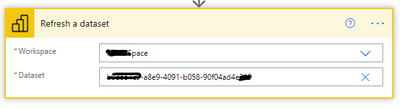
I'm currently calling the 'Refresh a dataset' Action from Power Automate which works great when you manually select the Dataset or hardcode the DatasetID (found in the URL). However, we have dozens of Datasets and would like to make this ID dynamic based on previous Flow logic.
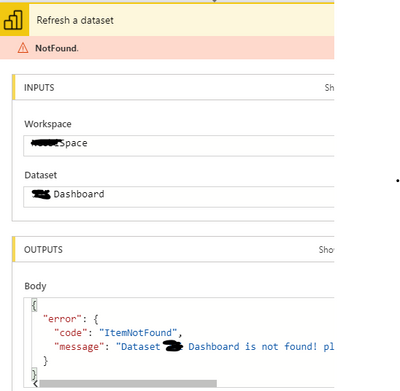
You can select the Dataset name from the drop down but when typing in the same string value as the Dataset, I receive an error:
How can I make the DatasetID dynamic? I tried calling HTTP GET Request to https://api.powerbi.com/v1.0/myorg/datasets but it returns a 403, even with the Authentication Bearer token.
Solved! Go to Solution.
As you can see in the screenshot, we are hardcoding the GUID to get around the issue. Since you suggest creating a custom connector, we have decided to store the DatasetIDs in a SharePoint list and query that based on the current client.
Where you able to resolve this ? , facing the same issue
You need to provide the datased GUID, not its name. Either have a list of GUIDs or use a Power BI REST API call to enumerate them. You need to register a custom connector/app with the right permissions and swagger definitions for that.
As you can see in the screenshot, we are hardcoding the GUID to get around the issue. Since you suggest creating a custom connector, we have decided to store the DatasetIDs in a SharePoint list and query that based on the current client.
Don't miss out on Data Days, June 15 through August 7. Learn Fabric, Power BI, SQL, AI and more.
Check out the May 2026 Power BI update to learn about new features.
| User | Count |
|---|---|
| 17 | |
| 11 | |
| 11 | |
| 8 | |
| 8 |
| User | Count |
|---|---|
| 41 | |
| 36 | |
| 35 | |
| 35 | |
| 20 |