cancel
Showing results for 
Search instead for 
Did you mean: 

View all the Fabric Data Days sessions on demand. View schedule

Reply
Anonymous
Not applicable

Refresh (PowerBI service) error on connect to Cognitive Services

While in PowerBI Desktop everything works - connection with access key to the cognitive service to receive Key Words.
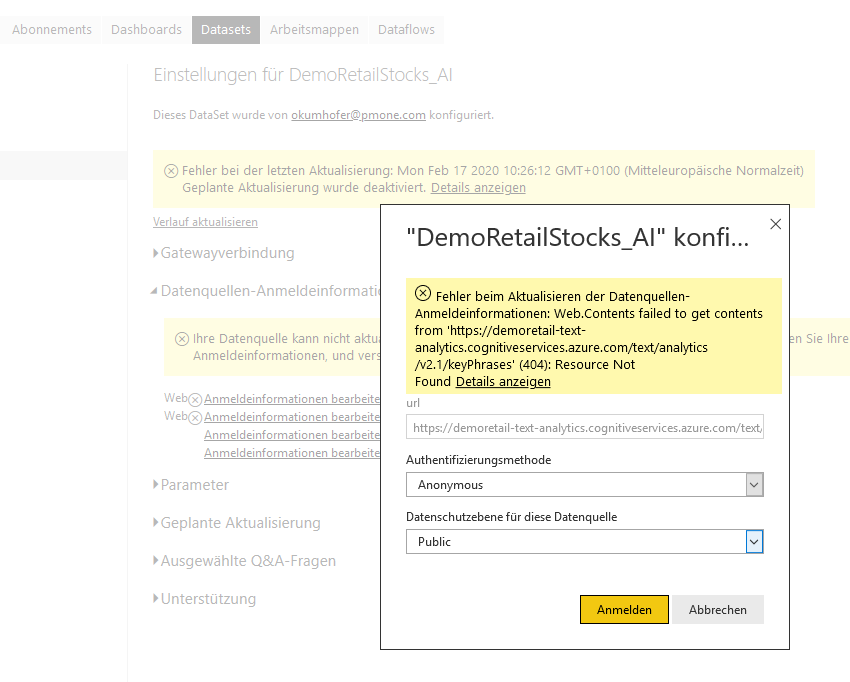
After publish to the service the refresh fails, also to reconnect on PowerBI service gives this error:


Fehler beim Aktualisieren der Datenquellen-Anmeldeinformationen: Web.Contents failed to get contents from 'https://demoretail-text-analytics.cognitiveservices.azure.com/text/analytics/v2.1/keyPhrases' (404): Resource Not Found

1 ACCEPTED SOLUTION

Hi @Anonymous ,


Yes, this feature requires the license of Power BI premium.Service is a bit different from Desktop,and license is only required in service.


Annotation 2020-02-18 161811.png


Best Regards,
Kelly
 
Did I answer your question? Mark my post as a solution!

View solution in original post

5 REPLIES 5
v-kelly-msft
Community Support
Community Support

Hi @Anonymous ,


After you published to service,if you need to refresh your data,you need first to configure the data source about the dataset.


Here is the reference.


Best Regards,
Kelly
 
Did I answer your question? Mark my post as a solution!
Anonymous
Not applicable

Hi!

I realy do not understand the answer - I have to configure a gateway to "Azure Cognitive services"??? Makes no sense for me.

Of course the data has to be refreshed, that is exactly the problem!
On Desktop refresh works, in the service it gives this error!
Also in the dataset setting at PBService the connection can not be reentered as there is nothing to reenter.


DatasetDataset

Hi @Anonymous ,


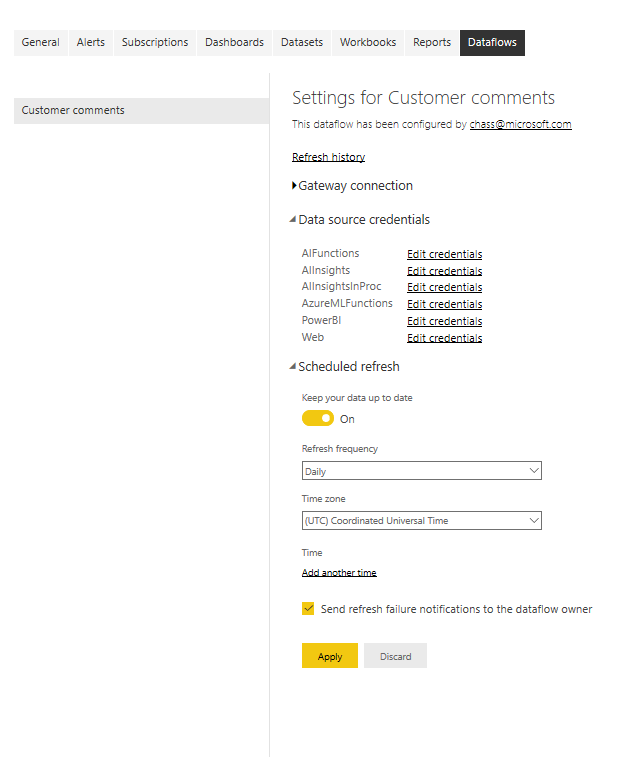
Just now I tested Cognitive Services on my computer, as you see below:


Annotation 2020-02-18 153440.png


Here, I have configued data source credentials and I can set a schedule refresh.

For the reference ,pls click here.


Best Regards,
Kelly
 
Did I answer your question? Mark my post as a solution!
Anonymous
Not applicable

Hi!

"Access to a Power BI Premium capacity with the AI workload enabled"

Does that mean it can not be used with PowerBI Pro?
But everyting works perfect in PB Desktop, only in PB Service I get this errors with "text analysis" call.


Oliver

Hi @Anonymous ,


Yes, this feature requires the license of Power BI premium.Service is a bit different from Desktop,and license is only required in service.


Annotation 2020-02-18 161811.png


Best Regards,
Kelly
 
Did I answer your question? Mark my post as a solution!

Helpful resources

Announcements
November Power BI Update Carousel

Power BI Monthly Update - November 2025

Check out the November 2025 Power BI update to learn about new features.

Fabric Data Days Carousel

Fabric Data Days

Advance your Data & AI career with 50 days of live learning, contests, hands-on challenges, study groups & certifications and more!

FabCon Atlanta 2026 carousel

FabCon Atlanta 2026

Join us at FabCon Atlanta, March 16-20, for the ultimate Fabric, Power BI, AI and SQL community-led event. Save $200 with code FABCOMM.

Top Solution Authors