Get Fabric or SQL Certified for Free.
Get certified for free when you join Fabric Data Days 2026 and dive into Fabric, Power BI, SQL, AI, and other essential data skills.
Join now- Power BI forums
- Get Help with Power BI
- Desktop
- Service
- Report Server
- Power Query
- Mobile Apps
- Developer
- DAX Commands and Tips
- Custom Visuals Development Discussion
- Health and Life Sciences
- Power BI Spanish forums
- Translated Spanish Desktop
- Training and Consulting
- Instructor Led Training
- Dashboard in a Day for Women, by Women
- Galleries
- Data Stories Gallery
- Themes Gallery
- Contests Gallery
- QuickViz Gallery
- Quick Measures Gallery
- Visual Calculations Gallery
- Fabric Apps Gallery
- Notebook Gallery
- Translytical Task Flow Gallery
- TMDL Gallery
- R Script Showcase
- Webinars and Video Gallery
- Ideas
- Custom Visuals Ideas (read-only)
- Issues
- Issues
- Events
- Upcoming Events
July 28 - August 9 | Final Round of the Power BI Dataviz World Championships. This is your chance. Learn more
- Power BI forums
- Forums
- Get Help with Power BI
- Service
- Re: Refresh Issue
- Subscribe to RSS Feed
- Mark Topic as New
- Mark Topic as Read
- Float this Topic for Current User
- Bookmark
- Subscribe
- Printer Friendly Page

- Mark as New
- Bookmark
- Subscribe
- Mute
- Subscribe to RSS Feed
- Permalink
- Report Inappropriate Content
Refresh Issue
Hi,
I have been expericing the issue in refreshing data set.
It is happening from both 'Scheduled' and 'On Demand'.
Stragenly, it seems working fine in the first 1 or 2 hours, and then it stops working with the 'Invalid Credential' error message.
As seen from the screeen capture, when refresh finish around 1 hour, it completes successfully. but it goes more than 2 hours. then it fails. So now I suspect it might be caued by the token life length of the AD account that is used to connect to Dyanmics CRM (only data source).
Could it be the cause of the issue? Or maybe something else?

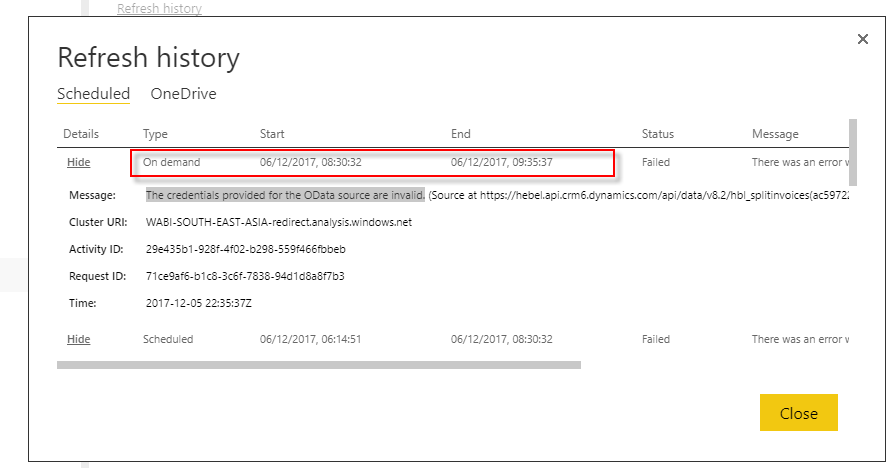
Solved! Go to Solution.


- Mark as New
- Bookmark
- Subscribe
- Mute
- Subscribe to RSS Feed
- Permalink
- Report Inappropriate Content
Hi @daniel-song,
The issue should be related to MFA (Multi-factor Authentication) for OAuth. I got internal information that at the end of this week, MFA (Multi-factor Authentication) for OAuth will be enabled for all clusters.
Would you please test again at that time and let me know the results?
Best Regards,
Qiuyun Yu
If this post helps, then please consider Accept it as the solution to help the other members find it more quickly.
- Mark as New
- Bookmark
- Subscribe
- Mute
- Subscribe to RSS Feed
- Permalink
- Report Inappropriate Content
Hi Qiuyun Yu,
This week's test is successful.
Thank you for your support.
Daniel
- Mark as New
- Bookmark
- Subscribe
- Mute
- Subscribe to RSS Feed
- Permalink
- Report Inappropriate Content
Hi @daniel-song,
Thanks for your update. As the issue is gone now, I will close this thread.
Best Regards,
Qiuyun Yu
If this post helps, then please consider Accept it as the solution to help the other members find it more quickly.
- Mark as New
- Bookmark
- Subscribe
- Mute
- Subscribe to RSS Feed
- Permalink
- Report Inappropriate Content
Hi Qiuyun Yu,
This week's test is successful.
Thank you for your support.
Daniel
- Mark as New
- Bookmark
- Subscribe
- Mute
- Subscribe to RSS Feed
- Permalink
- Report Inappropriate Content
Hi Qiuyun Yu,
Thank you for response and I will test it next week and post the outcome here.
And re. your questions in your previous post.
- Please go to dataset settings-> Data source credentials, enter the credential again then to see if you can refresh. (I tried it and manual refresh failed)
- Please download a copy and open in Power BI desktop to refresh data to see if issue only happens in Power BI service. (I can complete refresh with Power BI Desktop successfully)
Regards,
Daniel Song
- Mark as New
- Bookmark
- Subscribe
- Mute
- Subscribe to RSS Feed
- Permalink
- Report Inappropriate Content
Hi @daniel-song,
The issue should be related to MFA (Multi-factor Authentication) for OAuth. I got internal information that at the end of this week, MFA (Multi-factor Authentication) for OAuth will be enabled for all clusters.
Would you please test again at that time and let me know the results?
Best Regards,
Qiuyun Yu
If this post helps, then please consider Accept it as the solution to help the other members find it more quickly.

- Mark as New
- Bookmark
- Subscribe
- Mute
- Subscribe to RSS Feed
- Permalink
- Report Inappropriate Content
- Mark as New
- Bookmark
- Subscribe
- Mute
- Subscribe to RSS Feed
- Permalink
- Report Inappropriate Content
Hi @daniel-song,
Please go to dataset settings-> Data source credentials, enter the credential again then to see if you can refresh.
Please download a copy and open in Power BI desktop to refresh data to see if issue only happens in Power BI service.
Best Regards,
Qiuyun Yu
If this post helps, then please consider Accept it as the solution to help the other members find it more quickly.

Helpful resources

FabCon & SQLCon – Barcelona 2026
Join us in Barcelona for FabCon and SQLCon, the Fabric, Power BI, SQL, and AI community event. Save €200 with code FABCMTY200.

Fabric Community Sticker Challenge - Barcelona 2026
If you love stickers, then you will definitely want to check out our community sticker challenge, Barcelona edition!

Power BI Monthly Update - July 2026
Check out the July 2026 Power BI update to learn about new features.

Power BI DataViz World Championships - June 2026
A new Power BI DataViz World Championship is coming this June! Don't miss out on submitting your entry.

| User | Count |
|---|---|
| 17 | |
| 8 | |
| 6 | |
| 6 | |
| 5 |


