cancel
Showing results for 
Search instead for 
Did you mean: 

The Power BI Data Visualization World Championships is back! Get ahead of the game and start preparing now! Learn more

Reply
Anonymous
Not applicable

Refresh Dataset with Dynamic Web Query with API Key and JW-Token in the Power BI Service

Hello,


i have the two following tables:

Table1:


let
    Source = Json.Document(Web.Contents("http://my.url/", [Headers=[#"x-api-key"="XXXXXXXXXXXXXXXXXXXXX"], RelativePath="the/restofmyurl"])),
    #"Converted to Table" = Record.ToTable(Source),
    #"Removed Columns" = Table.RemoveColumns(#"Converted to Table",{"Name"})
in
    #"Removed Columns"


Table2:


let
    Source = Json.Document(Web.Contents("http://my.url/", [Headers=[#"x-api-key"="XXXXXXXXXXXXXXXXXXX", Authorization="Bearer "&Table.FirstValue(Table1)], RelativePath="another/partoftheurl12345"])),
    #"Converted to Table" = Record.ToTable(Source),
    #"Expanded {0}" = Table.ExpandListColumn(#"Converted to Table", "Value"),
    #"Expanded {0}1" = Table.ExpandRecordColumn(#"Expanded {0}", "Value", {"nummer", "kennzeichen", "anschaffungsdatum", "vorname", "nachname", "einstellungsdatum"}, {"Value.nummer", "Value.kennzeichen", "Value.anschaffungsdatum", "Value.vorname", "Value.nachname", "Value.einstellungsdatum"})
in
    #"Expanded {0}1"


the first Table is getting an JW-Token and the second Table is using that Token in its query as a dynamic field and an API-Key to get Data. This solution is working fine in Power BI Desktop but when I want to publish it to the service I am having trouble refreshing the data.


I tried to connect it by using Authentication Method: Anonymous like in the desktop and I tried to create an on-premise data gateway with a web data source with the same URL used in desktop, both didnt work.


Can you help tell me what I need to do in order to get my data to refresh or is my solution not going to work in the service? Thank You

1 ACCEPTED SOLUTION
Anonymous
Not applicable

The solution is to combine both tables into one query and the Base URL needs to return a HTTP 200 answer without an API Key provided. https://community.powerbi.com/t5/Service/Refreshing-a-web-source-with-an-API-Key-and-a-dynamic/m-p/9...

View solution in original post

4 REPLIES 4
Anonymous
Not applicable

The solution is to combine both tables into one query and the Base URL needs to return a HTTP 200 answer without an API Key provided. https://community.powerbi.com/t5/Service/Refreshing-a-web-source-with-an-API-Key-and-a-dynamic/m-p/9...

v-alq-msft
Community Support
Community Support

Hi, @Anonymous 


Is there any error message? 


Best Regards

Allan

Anonymous
Not applicable

Hi @v-alq-msft,


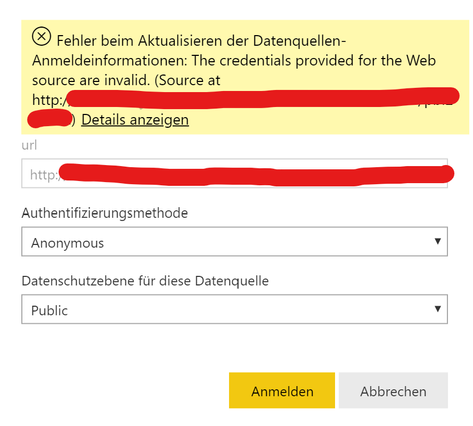
i am getting following error when i try to connect:

Anmerkung 2020-02-10 101607.png

it dosent matter if i set it to public, organisational or none.


I get the same error when i try to configure a on-premises web data gateway.


Hi, @Anonymous 


You may refer to the following similar case. It may help.

https://community.powerbi.com/t5/Service/PowerBI-Web-Source-Data-Refresh/m-p/607720


Best Regards

Allan

Helpful resources

Announcements
Power BI DataViz World Championships

Power BI Dataviz World Championships

The Power BI Data Visualization World Championships is back! Get ahead of the game and start preparing now!

December 2025 Power BI Update Carousel

Power BI Monthly Update - December 2025

Check out the December 2025 Power BI Holiday Recap!

FabCon Atlanta 2026 carousel

FabCon Atlanta 2026

Join us at FabCon Atlanta, March 16-20, for the ultimate Fabric, Power BI, AI and SQL community-led event. Save $200 with code FABCOMM.