cancel
Showing results for 
Search instead for 
Did you mean: 

July 7 - July 17 | Round 2 of the Power BI Dataviz World Championships. Don't miss your chance! Learn more

Reply
Anonymous
Not applicable

Refresh Dataset with Dynamic Web Query with API Key and JW-Token in the Power BI Service

Hello,


i have the two following tables:

Table1:


let
    Source = Json.Document(Web.Contents("http://my.url/", [Headers=[#"x-api-key"="XXXXXXXXXXXXXXXXXXXXX"], RelativePath="the/restofmyurl"])),
    #"Converted to Table" = Record.ToTable(Source),
    #"Removed Columns" = Table.RemoveColumns(#"Converted to Table",{"Name"})
in
    #"Removed Columns"


Table2:


let
    Source = Json.Document(Web.Contents("http://my.url/", [Headers=[#"x-api-key"="XXXXXXXXXXXXXXXXXXX", Authorization="Bearer "&Table.FirstValue(Table1)], RelativePath="another/partoftheurl12345"])),
    #"Converted to Table" = Record.ToTable(Source),
    #"Expanded {0}" = Table.ExpandListColumn(#"Converted to Table", "Value"),
    #"Expanded {0}1" = Table.ExpandRecordColumn(#"Expanded {0}", "Value", {"nummer", "kennzeichen", "anschaffungsdatum", "vorname", "nachname", "einstellungsdatum"}, {"Value.nummer", "Value.kennzeichen", "Value.anschaffungsdatum", "Value.vorname", "Value.nachname", "Value.einstellungsdatum"})
in
    #"Expanded {0}1"


the first Table is getting an JW-Token and the second Table is using that Token in its query as a dynamic field and an API-Key to get Data. This solution is working fine in Power BI Desktop but when I want to publish it to the service I am having trouble refreshing the data.


I tried to connect it by using Authentication Method: Anonymous like in the desktop and I tried to create an on-premise data gateway with a web data source with the same URL used in desktop, both didnt work.


Can you help tell me what I need to do in order to get my data to refresh or is my solution not going to work in the service? Thank You

1 ACCEPTED SOLUTION
Anonymous
Not applicable

The solution is to combine both tables into one query and the Base URL needs to return a HTTP 200 answer without an API Key provided. https://community.powerbi.com/t5/Service/Refreshing-a-web-source-with-an-API-Key-and-a-dynamic/m-p/9...

View solution in original post

4 REPLIES 4
Anonymous
Not applicable

The solution is to combine both tables into one query and the Base URL needs to return a HTTP 200 answer without an API Key provided. https://community.powerbi.com/t5/Service/Refreshing-a-web-source-with-an-API-Key-and-a-dynamic/m-p/9...

v-alq-msft
Community Support
Community Support

Hi, @Anonymous 


Is there any error message? 


Best Regards

Allan

Anonymous
Not applicable

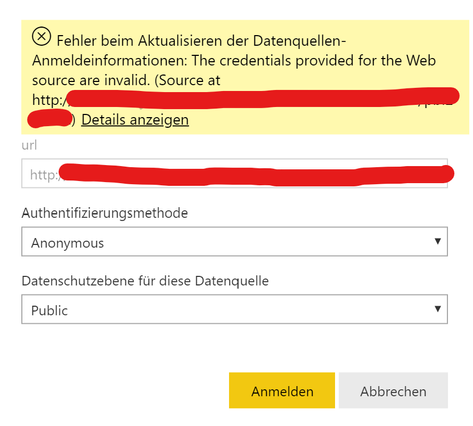
Hi @v-alq-msft,


i am getting following error when i try to connect:

Anmerkung 2020-02-10 101607.png

it dosent matter if i set it to public, organisational or none.


I get the same error when i try to configure a on-premises web data gateway.


Hi, @Anonymous 


You may refer to the following similar case. It may help.

https://community.powerbi.com/t5/Service/PowerBI-Web-Source-Data-Refresh/m-p/607720


Best Regards

Allan

Helpful resources

Announcements
FabCon and SQLCon Barcelona 2026

FabCon & SQLCon – Barcelona 2026

Join us in Barcelona for FabCon and SQLCon, the Fabric, Power BI, SQL, and AI community event. Save €200 with code FABCMTY200.

60 days of Data Days Carousel

Data Days 2026

Join Fabric Data Days 2026: 60 days of free live/on-demand sessions, challenges, study groups, and certification opportunities.

Power BI DataViz World Championships carousel

Power BI DataViz World Championships - June 2026

A new Power BI DataViz World Championship is coming this June! Don't miss out on submitting your entry.