Get Fabric or SQL Certified for Free.
Get certified for free when you join Fabric Data Days 2026 and dive into Fabric, Power BI, SQL, AI, and other essential data skills.
Join now- Power BI forums
- Get Help with Power BI
- Desktop
- Service
- Report Server
- Power Query
- Mobile Apps
- Developer
- DAX Commands and Tips
- Custom Visuals Development Discussion
- Health and Life Sciences
- Power BI Spanish forums
- Translated Spanish Desktop
- Training and Consulting
- Instructor Led Training
- Dashboard in a Day for Women, by Women
- Galleries
- Data Stories Gallery
- Themes Gallery
- Contests Gallery
- QuickViz Gallery
- Quick Measures Gallery
- Visual Calculations Gallery
- Fabric Apps Gallery
- Notebook Gallery
- Translytical Task Flow Gallery
- TMDL Gallery
- R Script Showcase
- Webinars and Video Gallery
- Ideas
- Custom Visuals Ideas (read-only)
- Issues
- Issues
- Events
- Upcoming Events
July 28 - August 9 | Final Round of the Power BI Dataviz World Championships. This is your chance. Learn more
- Power BI forums
- Forums
- Get Help with Power BI
- Service
- Re: R Visual Script Execution Time out
- Subscribe to RSS Feed
- Mark Topic as New
- Mark Topic as Read
- Float this Topic for Current User
- Bookmark
- Subscribe
- Printer Friendly Page

- Mark as New
- Bookmark
- Subscribe
- Mute
- Subscribe to RSS Feed
- Permalink
- Report Inappropriate Content
R Visual Script Execution Time out
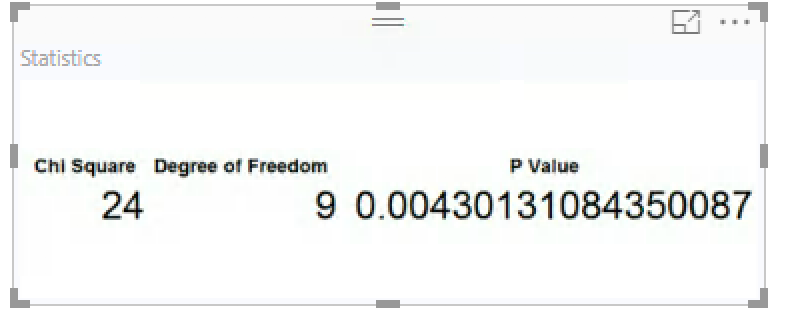
I have added a R Visual in my report. Here is the R Script which provides the visual as a Dataframe
install.packages("gridExtra",repos="http://cran.us.r-project.org")
library(gridExtra)

with(dataset, {
  out_matrix <- matrix(0,nrow=nlevels(ANSWER1), ncol=nlevels(ANSWER2),
                dimnames=list(levels(ANSWER1), levels(ANSWER2)))
  out_matrix [cbind(ANSWER1,ANSWER2)] <- COUNT
#grid.table(out_matrix )
Xsq <- chisq.test(out_matrix )
pvalue <- toString(Xsq$p.value)
df <- toString(Xsq$parameter)
csq <- toString(Xsq$statistic)

x<-data.frame(csq,df,pvalue)
names(x)<-c("Chi Square","Degree of Freedom","P Value")

mytheme <- gridExtra::ttheme_default(
    core = list(fg_params=list(hjust=1,x=1,cex = 2.0),bg_params=list(fill="white")),
    colhead = list(fg_params=list(cex = 1.0),bg_params=list(fill="white")),
    rowhead = list(fg_params=list(cex = 1.0)))

grid.table(x, rows = NULL,theme=mytheme )


})
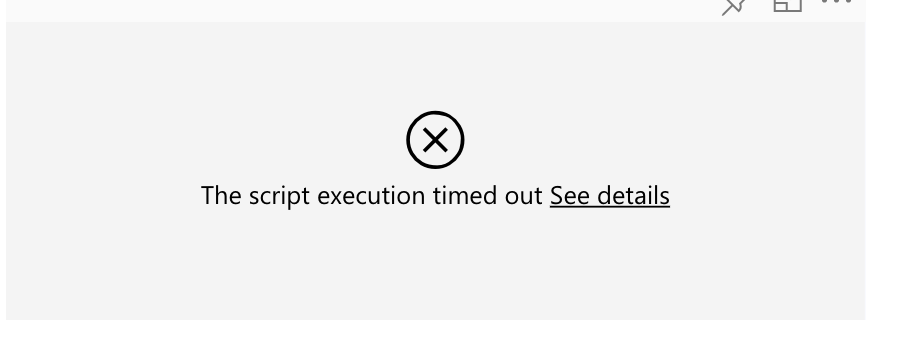
This works fine in Power BI Desktop but when I publish it and try to open in Power BI Service I only "Script Execution Time Out"
Please help
Solved! Go to Solution.

- Mark as New
- Bookmark
- Subscribe
- Mute
- Subscribe to RSS Feed
- Permalink
- Report Inappropriate Content
HI @kpratik,
I'd like to suggest you take a look at following link which told about limitations of r visual:
Creating R visuals in the Power BI service
Known Limitations
R visuals in the Power BI service have a few limitations:
- R visuals support is limited to the packages identified on the following page . There currently is no support for custom packages.
- Data size limitations – data used by the R visual for plotting is limited to 150,000 rows. If more than 150,000 rows are selected, only the top 150,000 rows are used and a message is displayed on the image.
- Calculation time limitation – if an R visual calculation exceeds 60 seconds the script times out, resulting in an error.
- R visuals are refreshed upon data updates, filtering, and highlighting. However, the image itself is not interactive and does not support tool tips.
- R visuals respond to highlighting other visuals, but you cannot click on elements in the R visual in order to cross filter other elements.
- R visuals are currently not supported for the Time data type. Please use Date/Time instead.
- R Visuals do not display when using Publish to web.
- R visuals currently do not print with dashboard and reports printing
- R visuals are currently not supported in the DirectQuery mode of Analysis Services
Regards,
Xiaoxin Sheng

- Mark as New
- Bookmark
- Subscribe
- Mute
- Subscribe to RSS Feed
- Permalink
- Report Inappropriate Content
I got the same issue.
The script execution timed out, please try again later
Please try again later or contact support. If you contact support, please provide these details.
Hide details
Activity ID189db995-aeb6-4715-99a2-a45d628dca41
Request ID82b8b626-d0a7-30d0-f20b-b421bc1f8399
Correlation ID72472f60-4c19-bd91-be5e-70bc60d76016
TimeTue Nov 08 2022 09:28:43 GMT+0100 (Central European Standard Time)
Service version13.0.19403.8
Client version2210.5.10743-train
Cluster URIhttps://wabi-north-europe-q-primary-redirect.analysis.windows.net/
I have checked the R visuals in the Power BI service have a few limitations.
But I still don't know which is exact reason.
Does anyone can help me? Thanks!
- Mark as New
- Bookmark
- Subscribe
- Mute
- Subscribe to RSS Feed
- Permalink
- Report Inappropriate Content
HI @kpratik,
I'd like to suggest you take a look at following link which told about limitations of r visual:
Creating R visuals in the Power BI service
Known Limitations
R visuals in the Power BI service have a few limitations:
- R visuals support is limited to the packages identified on the following page . There currently is no support for custom packages.
- Data size limitations – data used by the R visual for plotting is limited to 150,000 rows. If more than 150,000 rows are selected, only the top 150,000 rows are used and a message is displayed on the image.
- Calculation time limitation – if an R visual calculation exceeds 60 seconds the script times out, resulting in an error.
- R visuals are refreshed upon data updates, filtering, and highlighting. However, the image itself is not interactive and does not support tool tips.
- R visuals respond to highlighting other visuals, but you cannot click on elements in the R visual in order to cross filter other elements.
- R visuals are currently not supported for the Time data type. Please use Date/Time instead.
- R Visuals do not display when using Publish to web.
- R visuals currently do not print with dashboard and reports printing
- R visuals are currently not supported in the DirectQuery mode of Analysis Services
Regards,
Xiaoxin Sheng
- Mark as New
- Bookmark
- Subscribe
- Mute
- Subscribe to RSS Feed
- Permalink
- Report Inappropriate Content
Hi ,
I got the same issue as follows:
Execution Timeout
The script execution timed out, please try again later
- Activity ID189db995-aeb6-4715-99a2-a45d628dca41
- Request IDbf19419c-ab7e-0afa-e95a-0cb9c76b086c
- Correlation IDbc5bddef-18be-cb32-a6c1-43eb9822bed2
- TimeTue Nov 08 2022 11:40:53 GMT+0100 (Central European Standard Time)
- Service version13.0.19403.8
- Client version2210.5.10743-train
- Cluster URIhttps://wabi-north-europe-q-primary-redirect.analysis.windows.net/
I don't know what is the exact reason. Can you help me? Thanks!
And my R script as follows:
Vertical_data <- datasetlibrary(dplyr)library(ggplot2)my_vertical_data <- Vertical_data[!duplicated(Vertical_data[c('Depth')]),]if (!require("rLakeAnalyzer")){install.packages("rLakeAnalyzer")library(rLakeAnalyzer)}# A vector of water temperaturesTemperature <- my_vertical_data$TemperatureMean_Temp <- mean(my_vertical_data$Temperature)#A vector defining the depthsdepths <- my_vertical_data$Deptht.d <- thermo.depth(Temperature,abs(depths), seasonal=FALSE)#plot(x=Temperature,y=depths,xlab = "Temp °C",ylab ="Depths(m)",xaxt = "n",width=8, height=100)#axis(3)#abline(h= -t.d, col="red")middle_temp <- (min(my_vertical_data$Temperature) + max(my_vertical_data$Temperature)) /2t.d.show <- round(t.d, digits = 1)t.d.show.text <- paste0("Thermocline position:-" , as.character(t.d.show) , " m")ggplot(my_vertical_data, aes(x=Temperature, y=Depth)) +geom_point(shape=21) + scale_x_continuous(position = "top") +geom_hline(yintercept = -t.d,col ="red") +geom_text(x=middle_temp, y=-t.d+1.5, label=t.d.show.text,col = "blue",cex =6) +labs( x="Temp °C", y="Depth(m)" )

- Mark as New
- Bookmark
- Subscribe
- Mute
- Subscribe to RSS Feed
- Permalink
- Report Inappropriate Content
@Anonymous I am having this same issue. Is there a way to edit the visual or timeout duration so my visual will load?
- Mark as New
- Bookmark
- Subscribe
- Mute
- Subscribe to RSS Feed
- Permalink
- Report Inappropriate Content
Thank you.
Helpful resources

Fabric Community Sticker Challenge - Barcelona 2026
If you love stickers, then you will definitely want to check out our community sticker challenge, Barcelona edition!

Power BI Monthly Update - July 2026
Check out the July 2026 Power BI update to learn about new features.

Power BI DataViz World Championships - June 2026
A new Power BI DataViz World Championship is coming this June! Don't miss out on submitting your entry.

| User | Count |
|---|---|
| 10 | |
| 10 | |
| 9 | |
| 9 | |
| 5 |


