This time we’re going bigger than ever. Fabric, Power BI, SQL, AI and more. We're covering it all. You won't want to miss it.
Learn moreDid you hear? There's a new SQL AI Developer certification (DP-800). Start preparing now and be one of the first to get certified. Register now
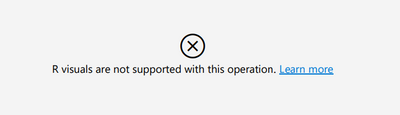
I have a report on a premium service that uses R Script visuals. I need to send out a PDF copy of the report monthly but the R script visuals do not export to the PDF. I get this error.
is there anyway to fix this error or to export the report a different way where the R visuals work?
Solved! Go to Solution.
Hi @Alex_Bell
No, this is a known limitation of PDF export, R and Python visuals aren't currently supported. In the PDF, these visuals are blank and display an error message.
see: Export reports to PDF - Power BI | Microsoft Docs
Your best alternative is to use a screen capture (WIN+S) to copy and paste the visual into a document.
Hope this helps
Stuart
Hi @Alex_Bell
No, this is a known limitation of PDF export, R and Python visuals aren't currently supported. In the PDF, these visuals are blank and display an error message.
see: Export reports to PDF - Power BI | Microsoft Docs
Your best alternative is to use a screen capture (WIN+S) to copy and paste the visual into a document.
Hope this helps
Stuart
Thank you for the response.
Unfortunately this does not help but I will try and work around it.
I have found that you can export to PDF from the desktop version so that might be my temporary countermeasure.
I know this is an old thread but if anyone else finds this like I did, there's an open suggestion to Microsoft for this. I need this option too, screenshot of 50+ pages isn't ideal. The suggestion to Microsoft is very old too but maybe we can pick it back up and get the votes:
https://ideas.fabric.microsoft.com/ideas/idea/?ideaid=cb115730-621f-eb11-8441-281878bd9103
Check out the April 2026 Power BI update to learn about new features.
Sign up to receive a private message when registration opens and key events begin.
If you have recently started exploring Fabric, we'd love to hear how it's going. Your feedback can help with product improvements.
| User | Count |
|---|---|
| 10 | |
| 8 | |
| 7 | |
| 7 | |
| 7 |
| User | Count |
|---|---|
| 49 | |
| 27 | |
| 21 | |
| 20 | |
| 20 |