This is best Fabric, Power BI, SQL and AI community event. How do we know? The last event sold out! Save €200 with code FABCMTY200.
Register nowA new Data Days event is coming soon! This time we’re going bigger than ever. Fabric, Power BI, SQL, AI and more. Don't miss out.
I need refreshing dashboard on powerbi.
I have in excel file query from internal server, where access for this report is only in corporate network. I copied this excel file to onedrive business, connected with PBI service and checked one hour refresh. But this solution doesn;t work. I think, if query requires a corporate network, and i have file on onedrive, maybe in this place is problem.
Do you have solution for this issue?
Solved! Go to Solution.
Hi @arveseba,
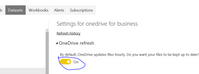
As I tested, if you sync OneDrive for Business with your local cimputer. Whenever you're online, any changes of the excel fine that you make will sync automatically. In Power BI service, please click Get Data->files->onedrive for business->select the file, when you can create schedule refresh, turn on the refresh buttom(please see the button highlghted in blue line), the dataset will refresh one hour without gateway.
Best Regards,
Angelia
Hmm, that should work but there may be some dependency that requires network access. You should be able to use a gateway instead.
I now, but i have security policy and i can't create a gateway. I thought about this solution:
Create a excel file, example name "first.xls" with query from internal server on local pc.
Create second excel file, where i have query from "first.xls" and copied this file to onedrive.
Create dashboard with one-drive one hour refreshing.
Oh, yeah, that's not going to work. You need a gateway or you need to ship the data from the internal server up into the cloud.
I know about. But if i ship the data like this:
Internal Server>local file in PC (connected in corporate network) -> one drive businness.
Maybe this solution work?
Hi @arveseba,
As I tested, if you sync OneDrive for Business with your local cimputer. Whenever you're online, any changes of the excel fine that you make will sync automatically. In Power BI service, please click Get Data->files->onedrive for business->select the file, when you can create schedule refresh, turn on the refresh buttom(please see the button highlghted in blue line), the dataset will refresh one hour without gateway.
Best Regards,
Angelia
Check out the May 2026 Power BI update to learn about new features.
Sign up to receive a private message when registration opens and key events begin.
If you have recently started exploring Fabric, we'd love to hear how it's going. Your feedback can help with product improvements.
| User | Count |
|---|---|
| 8 | |
| 8 | |
| 8 | |
| 7 | |
| 7 |
| User | Count |
|---|---|
| 21 | |
| 21 | |
| 18 | |
| 15 | |
| 13 |