Join us in Barcelona for FabCon and SQLCon, September 28 - October 1, 2026.
This is best Fabric, Power BI, SQL and AI community event. How do we know? The last event sold out! Save €200 with code FABCMTY200.
Register now- Power BI forums
- Get Help with Power BI
- Desktop
- Service
- Report Server
- Power Query
- Mobile Apps
- Developer
- DAX Commands and Tips
- Custom Visuals Development Discussion
- Health and Life Sciences
- Power BI Spanish forums
- Translated Spanish Desktop
- Training and Consulting
- Instructor Led Training
- Dashboard in a Day for Women, by Women
- Galleries
- Data Stories Gallery
- Themes Gallery
- Contests Gallery
- QuickViz Gallery
- Quick Measures Gallery
- Visual Calculations Gallery
- Fabric Apps Gallery
- Notebook Gallery
- Translytical Task Flow Gallery
- TMDL Gallery
- R Script Showcase
- Webinars and Video Gallery
- Ideas
- Custom Visuals Ideas (read-only)
- Issues
- Issues
- Events
- Upcoming Events
The Fabric community is upgrading! Read all of the details including the timeline and what you can expect. Learn more
- Power BI forums
- Forums
- Get Help with Power BI
- Service
- Re: Query contains unsupported function. Function ...
- Subscribe to RSS Feed
- Mark Topic as New
- Mark Topic as Read
- Float this Topic for Current User
- Bookmark
- Subscribe
- Printer Friendly Page

- Mark as New
- Bookmark
- Subscribe
- Mute
- Subscribe to RSS Feed
- Permalink
- Report Inappropriate Content
Query contains unsupported function. Function name: Resource.Access in Power BI setting
we get a problem like this:
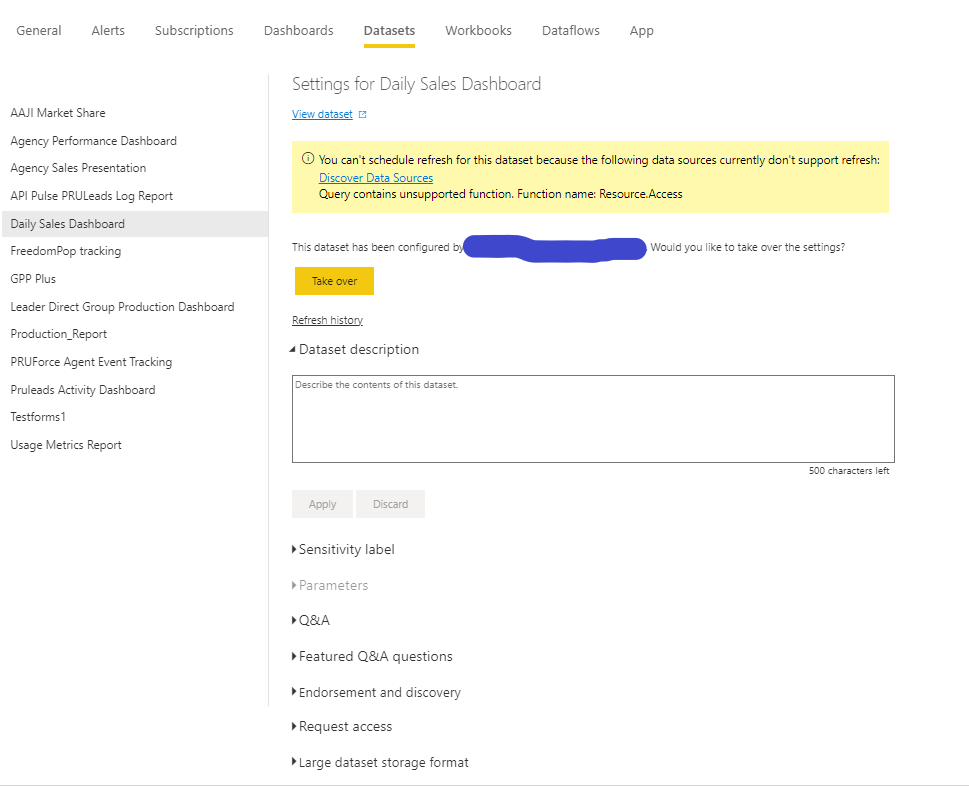
"You can't schedule refresh for this dataset because the following data sources currently don't support refresh:
Query contains unsupported function. Function name: Resource.Access".
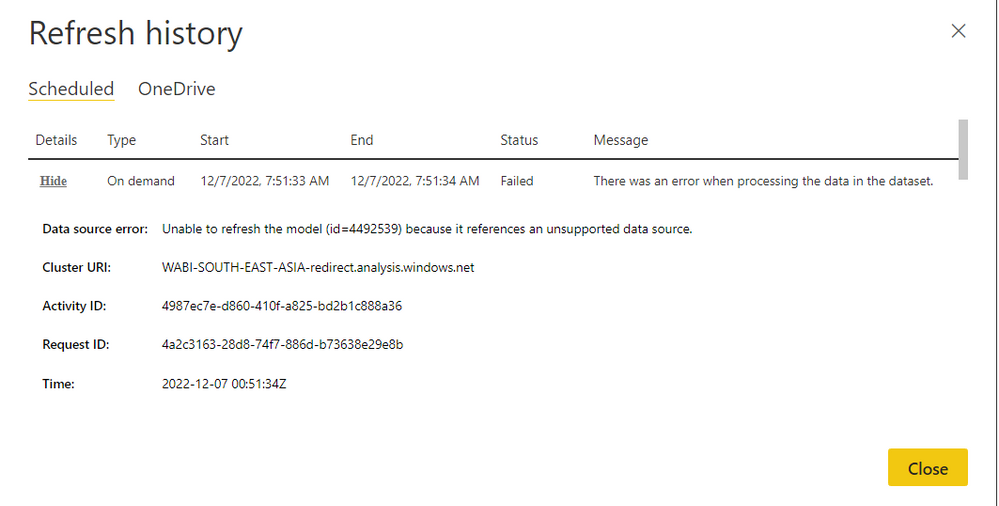
As a result, schedule and gateway options cannot be seen in power bi settings, and cannot create scheduler. even if i do a manual refresh, it will fail at the same time.
"Data source error: Unable to refresh the model (id=4492539) because it references an unsupported data source."
I can only refresh on pbix desktop only.
please help regarding this problem.
notes :
-We use datasource COUCHBASE (CB), sqlserver, greenplum (GP) and excel online.
-Attached is an error screen capture in the settings section, and an error after manually refreshing
Solved! Go to Solution.
- Mark as New
- Bookmark
- Subscribe
- Mute
- Subscribe to RSS Feed
- Permalink
- Report Inappropriate Content
I've found where the problem is, as well as the solution.
first, please check every single data source that you use.
you can check this link : https://learn.microsoft.com/en-us/power-bi/connect-data/service-admin-troubleshoot-unsupported-data-...
then check your datasource, is it registered in this list: https://learn.microsoft.com/en-us/power-bi/connect-data/power-bi-data-sources
if you can't find the datasource you are using, it means the datasource is no longer usable.
for my case i use CdataCouchbase.
the solution for my condition, I can change it from CdataCouchbase to use ODBC, because ODBC is still registered in Datasource PBI list.
replace it like this:
from this :
= CdataCouchbase.DataSource("dnsName", null, [Query="<query>"])
to this :
= Odbc.Query("dsn=dnsName", "<query>")
i hope this can help. thx.
- Mark as New
- Bookmark
- Subscribe
- Mute
- Subscribe to RSS Feed
- Permalink
- Report Inappropriate Content
I've found where the problem is, as well as the solution.
first, please check every single data source that you use.
you can check this link : https://learn.microsoft.com/en-us/power-bi/connect-data/service-admin-troubleshoot-unsupported-data-...
then check your datasource, is it registered in this list: https://learn.microsoft.com/en-us/power-bi/connect-data/power-bi-data-sources
if you can't find the datasource you are using, it means the datasource is no longer usable.
for my case i use CdataCouchbase.
the solution for my condition, I can change it from CdataCouchbase to use ODBC, because ODBC is still registered in Datasource PBI list.
replace it like this:
from this :
= CdataCouchbase.DataSource("dnsName", null, [Query="<query>"])
to this :
= Odbc.Query("dsn=dnsName", "<query>")
i hope this can help. thx.
- Mark as New
- Bookmark
- Subscribe
- Mute
- Subscribe to RSS Feed
- Permalink
- Report Inappropriate Content
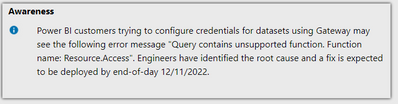
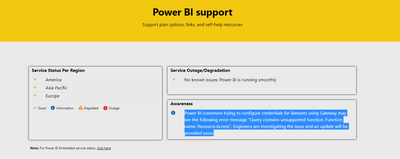
mine is already Odbc.Query like you have shown, I use denodo. There has been an update by support team, see screenshot below.

- Mark as New
- Bookmark
- Subscribe
- Mute
- Subscribe to RSS Feed
- Permalink
- Report Inappropriate Content
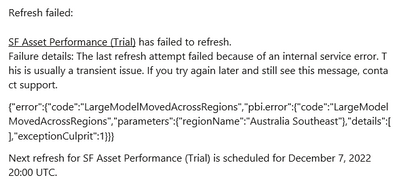
Even I am also facing the same challenge you can see below my error:
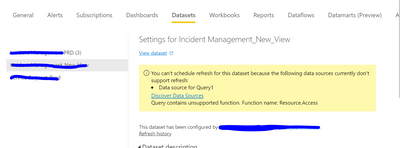
Please help this to get resolve
- Mark as New
- Bookmark
- Subscribe
- Mute
- Subscribe to RSS Feed
- Permalink
- Report Inappropriate Content
do you use the same datasource with me? like the CouchBase or datasource that I described above?
- Mark as New
- Bookmark
- Subscribe
- Mute
- Subscribe to RSS Feed
- Permalink
- Report Inappropriate Content
- Mark as New
- Bookmark
- Subscribe
- Mute
- Subscribe to RSS Feed
- Permalink
- Report Inappropriate Content
same issue, same region too
Helpful resources

FabCon & SQLCon – Barcelona 2026
Join us in Barcelona for FabCon and SQLCon, the Fabric, Power BI, SQL, and AI community event. Save €200 with code FABCMTY200.

Power BI DataViz World Championships - June 2026
A new Power BI DataViz World Championship is coming this June! Don't miss out on submitting your entry.

| User | Count |
|---|---|
| 14 | |
| 11 | |
| 9 | |
| 6 | |
| 5 |


