cancel
Showing results for 
Search instead for 
Did you mean: 

July 7 - July 17 | Round 2 of the Power BI Dataviz World Championships. Don't miss your chance! Learn more

Reply
ajsteers
Frequent Visitor

Query contains unsupported function. Function name: DataLake.Files

I switched from DataLake.Folder() to DataLake.Files() because the latter pulls down files in subfolders and I need to access files (by name filter) from a set of subfolders. Now I'm getting this error. I was very surprised to find that DataLake.Files() isn't supported by remote refresh in the Power BI service while DataLake.Folders() is supported.


1. Any plan to add support for automatically refreshing using the DataLake.Files() function?


2. In the meanwhile, are there any arguments or other workarounds I can use in the DataLake.Folders() to return the list of files in subfolders as well as the the main folder?


Thanks very much!

5 REPLIES 5
GilbertQ
Super User
Super User

Hi there

This can happen when the On-Premise Gateway Mashup Engine does not have all the capabilities of Power BI Desktop.

These typically follow at the very latest in the next months release of the On-Premise data gateway.


Did I answer your question? Mark my post as a solution!

Proud to be a Super User!


Power BI Blog

I'm not using the on premise data gateway. This is in regards to the app.powerbi.com service. Apparently the service supports DataLake.Folders() but not DataLake.Files() - much to my surprise - and I'm looking for a workaround to this issue.

Thanks for letting me know further details.


I am not sure how to solve this personally.


Did I answer your question? Mark my post as a solution!

Proud to be a Super User!


Power BI Blog

I wonder does anyone else have ideas on how to resolve - or any idea on timeline for when/if Power BI will support this natively?


I'm about to dive in again but wanted to check in here once more in case there are other ideas from the community.

Hi @ajsteers 


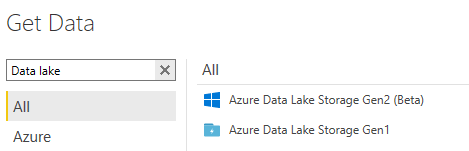
I see this when getting data from the Sep version of Power IB Desktop


image.png


Did I answer your question? Mark my post as a solution!

Proud to be a Super User!


Power BI Blog

Helpful resources

Announcements
FabCon and SQLCon Barcelona 2026

FabCon & SQLCon – Barcelona 2026

Join us in Barcelona for FabCon and SQLCon, the Fabric, Power BI, SQL, and AI community event. Save €200 with code FABCMTY200.

60 days of Data Days Carousel

Data Days 2026

Join Fabric Data Days 2026: 60 days of free live/on-demand sessions, challenges, study groups, and certification opportunities.

Power BI DataViz World Championships carousel

Power BI DataViz World Championships - June 2026

A new Power BI DataViz World Championship is coming this June! Don't miss out on submitting your entry.