cancel
Showing results for 
Search instead for 
Did you mean: 

Learn from the best! Meet the four finalists headed to the FINALS of the Power BI Dataviz World Championships! Register now

Reply
kyledametto
Frequent Visitor

Push Dataset dynamic chart content

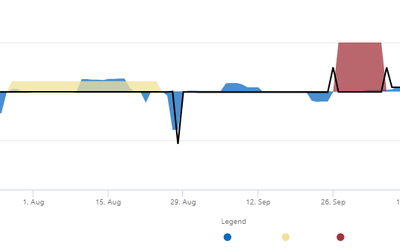
I have to be able to select what data is shown on a chart.

kyledametto_0-1670370449895.png

Each of the transparent area's need to be able to be turned on or off, and there can be up to 10 of these.

I have found ways to do this with a direct connection or import data but I can't find a way to do this with a push dataset as I am unable to make any transformations to the data model.


Is there a way to do this with a push dataset? Or will i have to work something else out with the way I get the data?

1 REPLY 1
v-yueyunzh-msft
Community Support
Community Support

Hi , @kyledametto 

A push dataset is a Power BI dataset that can be created and populated only by using the Power BI API.Push datasets are often confused with streaming datasets. A streaming dataset is a dataset that is updated in real time, with the data kept in a temporary cache used only to display the visuals.

As searched , i find this document about the push dataset , i hope it can be helpful :

Creating real-time dashboards in Power BI with push datasets - SQLBI


Thank you for your time and sharing, and thank you for your support and understanding of PowerBI! 


Best Regards,

Aniya Zhang

If this post helps, then please consider Accept it as the solution to help the other members find it more quickly

Helpful resources

Announcements
Power BI DataViz World Championships carousel

Power BI DataViz World Championships - June 2026

A new Power BI DataViz World Championship is coming this June! Don't miss out on submitting your entry.

Join our Fabric User Panel

Join our Fabric User Panel

Share feedback directly with Fabric product managers, participate in targeted research studies and influence the Fabric roadmap.

March Power BI Update Carousel

Power BI Community Update - March 2026

Check out the March 2026 Power BI update to learn about new features.

Top Kudoed Authors