Don't miss your chance to take the Fabric Data Engineer (DP-600) exam for FREE! Find out how by attending the DP-600 session on April 23rd (pacific time), live or on-demand.
Learn moreNext up in the FabCon + SQLCon recap series: The roadmap for Microsoft SQL and Maximizing Developer experiences in Fabric. All sessions are available on-demand after the live show. Register now
Hello everybody, I'll explain my problem.
I have a report with tables of API REST as a source. If I refresh the report in PowerBI Desktop, the data are correct (all the data from 2018 to 2020)
I upload the report to powerBI Service, configure the gateway and click refresh manually. OK. the data are correct too.
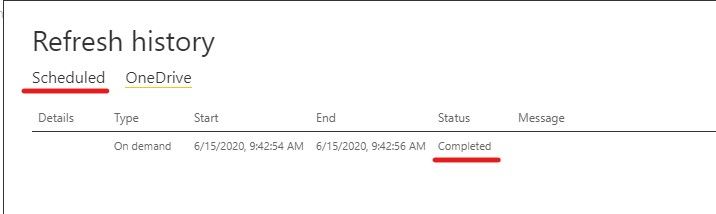
The problem is, when I configure a daily scheduled refresh, when it finishes, the data are INCORRECT, it brings me only the data from 2018.
Extra information: This report have been refreshed from 2018 to now.
So, my question is: Is a cache in powerBI Service that make me going crazy? It does not have sense.
I tried deleting and upload again the dataset (and has another ID) or changing the report and dataset's names. Nothing work.
Any ideas?
Thanks in advance
Hi @aoliver ,
1. First step is to check the refresh status in history in Power BI Service.
If the status is failed, please check the article.
2. You should always ensure that basic requirements for refresh are met and verified. These basic requirements include:
Verify the gateway version is up to date.
Verify the report has a gateway selected - if not, the data source may have changed or might be missing.
Once you've confirmed those requirements are met, take a look through the following sections for more troubleshooting.
Troubleshooting refresh scenarios
3. If it doesn’t meet your requirement, we suggest you to open a ticket here for help if you are a pro user: https://powerbi.microsoft.com/en-us/support/
Best regards,
Community Support Team _ zhenbw
If this post helps, then please consider Accept it as the solution to help the other members find it more quickly.
If you have recently started exploring Fabric, we'd love to hear how it's going. Your feedback can help with product improvements.
A new Power BI DataViz World Championship is coming this June! Don't miss out on submitting your entry.
Experience the highlights from FabCon & SQLCon, available live and on-demand starting April 14th.
| User | Count |
|---|---|
| 11 | |
| 10 | |
| 9 | |
| 8 | |
| 8 |