cancel
Showing results for 
Search instead for 
Did you mean: 

The Power BI Data Visualization World Championships is back! Get ahead of the game and start preparing now! Learn more

Reply
Temainfo-suport
Regular Visitor

Problem on a project/model

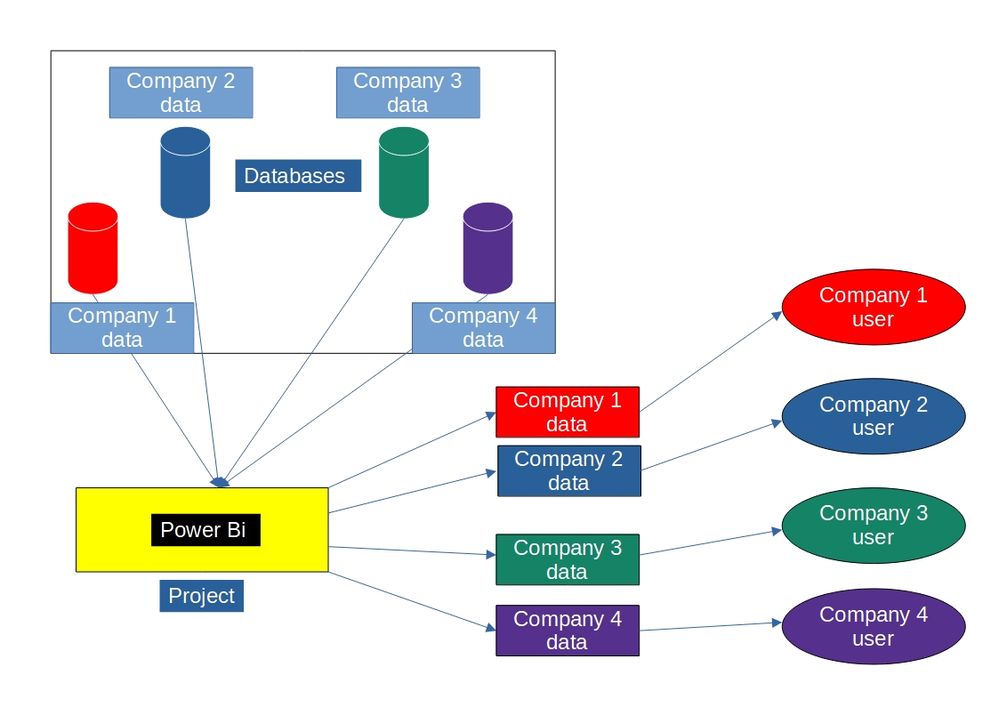
I Need to build a project on power Bi, the model needs to be like this image, multi databases, all datas has the same data model, each user can't acess others data, i'd like some options if possible, another thing is, how could i identify each database.PROJETO.jpg

1 ACCEPTED SOLUTION
Shahfaisal
Solution Sage
Solution Sage

Here is how you want to set up your data model:

1. A Company dimension to store company information (company id, company name, etc.).

2. All your fact tables will have a CompanyID to link to the Company dimension I mentioned in #1.

3. You will need a table that shows with user belongs to which company. This table will be used to setup Row LEvel Security. More information on this is here https://docs.microsoft.com/en-us/power-bi/enterprise/service-admin-rls


Your requirement to restrict users so that they can only see their data is achieved using Row Level Security. Your other requirement to identify each company database is achieved by using the company dimension - for example, if you are looking at Sales, you can use company dimension to break down sales by company, etc.

View solution in original post

1 REPLY 1
Shahfaisal
Solution Sage
Solution Sage

Here is how you want to set up your data model:

1. A Company dimension to store company information (company id, company name, etc.).

2. All your fact tables will have a CompanyID to link to the Company dimension I mentioned in #1.

3. You will need a table that shows with user belongs to which company. This table will be used to setup Row LEvel Security. More information on this is here https://docs.microsoft.com/en-us/power-bi/enterprise/service-admin-rls


Your requirement to restrict users so that they can only see their data is achieved using Row Level Security. Your other requirement to identify each company database is achieved by using the company dimension - for example, if you are looking at Sales, you can use company dimension to break down sales by company, etc.

Helpful resources

Announcements
Power BI DataViz World Championships

Power BI Dataviz World Championships

The Power BI Data Visualization World Championships is back! Get ahead of the game and start preparing now!

December 2025 Power BI Update Carousel

Power BI Monthly Update - December 2025

Check out the December 2025 Power BI Holiday Recap!

FabCon Atlanta 2026 carousel

FabCon Atlanta 2026

Join us at FabCon Atlanta, March 16-20, for the ultimate Fabric, Power BI, AI and SQL community-led event. Save $200 with code FABCOMM.