cancel
Showing results for 
Search instead for 
Did you mean: 

We've captured the moments from FabCon & SQLCon that everyone is talking about, and we are bringing them to the community, live and on-demand. Starts on April 14th. Register now

Reply
Temainfo-suport
Regular Visitor

Problem on a project/model

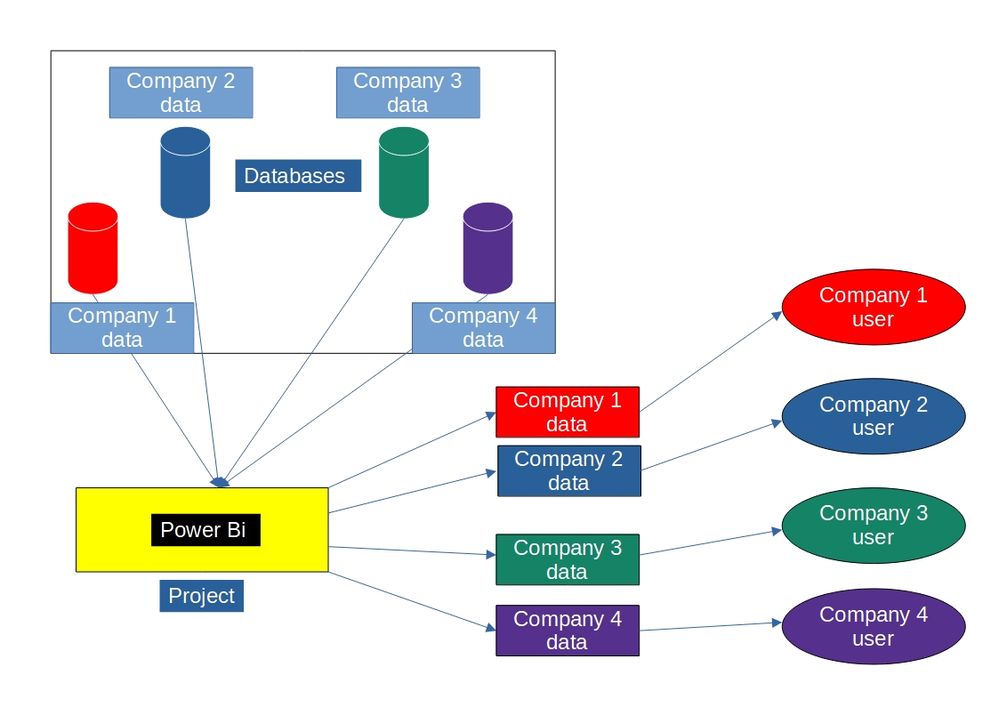
I Need to build a project on power Bi, the model needs to be like this image, multi databases, all datas has the same data model, each user can't acess others data, i'd like some options if possible, another thing is, how could i identify each database.PROJETO.jpg

1 ACCEPTED SOLUTION
Shahfaisal
Solution Sage
Solution Sage

Here is how you want to set up your data model:

1. A Company dimension to store company information (company id, company name, etc.).

2. All your fact tables will have a CompanyID to link to the Company dimension I mentioned in #1.

3. You will need a table that shows with user belongs to which company. This table will be used to setup Row LEvel Security. More information on this is here https://docs.microsoft.com/en-us/power-bi/enterprise/service-admin-rls


Your requirement to restrict users so that they can only see their data is achieved using Row Level Security. Your other requirement to identify each company database is achieved by using the company dimension - for example, if you are looking at Sales, you can use company dimension to break down sales by company, etc.

View solution in original post

1 REPLY 1
Shahfaisal
Solution Sage
Solution Sage

Here is how you want to set up your data model:

1. A Company dimension to store company information (company id, company name, etc.).

2. All your fact tables will have a CompanyID to link to the Company dimension I mentioned in #1.

3. You will need a table that shows with user belongs to which company. This table will be used to setup Row LEvel Security. More information on this is here https://docs.microsoft.com/en-us/power-bi/enterprise/service-admin-rls


Your requirement to restrict users so that they can only see their data is achieved using Row Level Security. Your other requirement to identify each company database is achieved by using the company dimension - for example, if you are looking at Sales, you can use company dimension to break down sales by company, etc.

Helpful resources

Announcements
New to Fabric survey Carousel

New to Fabric Survey

If you have recently started exploring Fabric, we'd love to hear how it's going. Your feedback can help with product improvements.

Power BI DataViz World Championships carousel

Power BI DataViz World Championships - June 2026

A new Power BI DataViz World Championship is coming this June! Don't miss out on submitting your entry.

Join our Fabric User Panel

Join our Fabric User Panel

Share feedback directly with Fabric product managers, participate in targeted research studies and influence the Fabric roadmap.

March Power BI Update Carousel

Power BI Community Update - March 2026

Check out the March 2026 Power BI update to learn about new features.

Top Solution Authors