My team is working on a model using SQL as a source in Import mode. The Directy Query mode is not viable since the backend is not sized to support it.
The issue developers face is whenever they do a change that affects the fact table, they need to run a full refresh for the update and to test if everything is ok. Time for the full update may take from 20 minutes to hours depending on their house’s connection speed.
I figured out that performance-wise, using Dataflow is a good solution, to minimize these waiting times during the development phase. Data from a dataflow is pulled in the model in less than 2 minutes when updating. Dataflow contains a query to the very same SQL source.
We cannot use the Dataflow as a permanent solution since our P1 node is already at capacity.
So I thought of a smarter approach that involves a Dataflow, a parameter, and a few lines of code in Power Query.
The idea is that developers can work using the dataflow as a source and when all is OK they can publish the model, then in the published dataset they can switch the parameter from the dataflow to the SQL and let the Power BI Service do the heavy load, that is pulling the data from the production source.
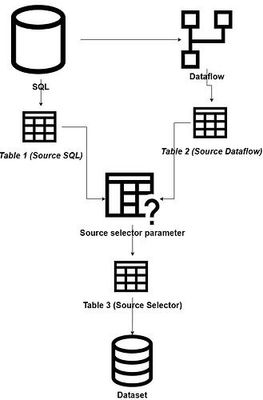
The switch mechanism is a simple if for the query of the final table.
let
- Source = if SourceSelector = “SQL” then Table1 else Table2
in - Source
Unfortunately, the dataset with the switch mechanism used, when updated return an error, apparently related to privacy settings. All privacy settings are consistent, both on PBI Desktop and the service. I've tried None and Organizational, but this made no difference.
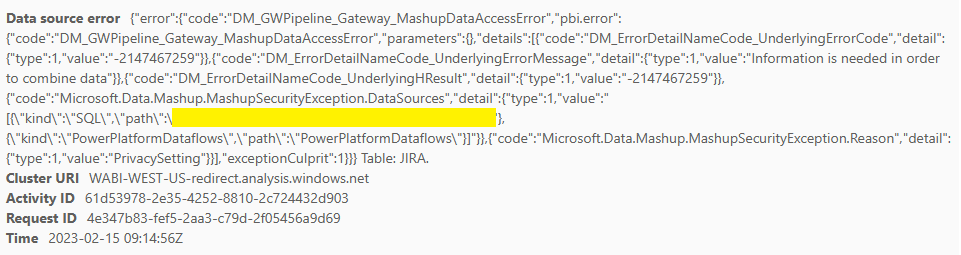
This does not occur when the if is not used and the source for Table 3 is hardcoded, like below, and this is driving me nuts.
let
I run numerous tests, but this seems to be the only variable that generates the error.
So privacy settings are all the same (set to None) all over the place, using the switch in Power BI Desktop work correctly (switching pulls from the data from the selected source).
What am I missing?
Googling around I found nothing that can help me to solve this riddle.
Do you have any suggestions on how to fix this or how to make the developers work in a more efficient way?
Help and suggestion is very appreciated
Thanks
Roberto


