Don't miss your chance to take the Fabric Data Engineer (DP-600) exam for FREE! Find out how by watching the DP-600 session on-demand now through April 28th.
Learn moreJoin the FabCon + SQLCon recap series. Up next: Power BI, Real-Time Intelligence, IQ and AI, and Data Factory take center stage. All sessions are available on-demand after the live show. Register now
Hi there,
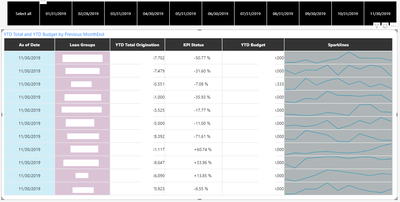
I am trying to find a way to display the aggregated YTD Total Originations and YTD Budget on the PowerKPI. How i got it setup is only displaying the max date that is selected on the slicer. I wanted to be able to select specific dates, and show the aggregated total. YTD are measures that calculate aggregated totals. Someone suggested to remove the date, but the visual gives an error when i remove the date value.
Thank you
Solved! Go to Solution.
Hi @gco ,
I want to know which formula you use to calculate YTD. The following formula can calculate YTD:
[YTD Sales] = CALCULATE ( [Sales Amount], DATESYTD( 'Date'[Date] ) )[YTD Sales] = TOTALYTD ( [Sales Amount] , 'Date'[Date] )[YTD Sales] =
CALCULATE (
[Sales Amount],
FILTER (
ALL ( 'Date'[Date] ),
AND (
'Date'[Date] >= DATE ( 2019, 1, 1 ),
'Date'[Date] <= MAX ( 'Date'[Date] )
)
)
)Maybe you can try the third formula to see if it works, if it doesn't work, kindly share your sample data and expected result if you don't have any Confidential Information.
Best Regards,
Community Support Team _ Joey
If this post helps, then please consider Accept it as the solution to help the other members find it more quickly.
The screenshot does not seem to show
Hi @gco ,
I want to know which formula you use to calculate YTD. The following formula can calculate YTD:
[YTD Sales] = CALCULATE ( [Sales Amount], DATESYTD( 'Date'[Date] ) )[YTD Sales] = TOTALYTD ( [Sales Amount] , 'Date'[Date] )[YTD Sales] =
CALCULATE (
[Sales Amount],
FILTER (
ALL ( 'Date'[Date] ),
AND (
'Date'[Date] >= DATE ( 2019, 1, 1 ),
'Date'[Date] <= MAX ( 'Date'[Date] )
)
)
)Maybe you can try the third formula to see if it works, if it doesn't work, kindly share your sample data and expected result if you don't have any Confidential Information.
Best Regards,
Community Support Team _ Joey
If this post helps, then please consider Accept it as the solution to help the other members find it more quickly.
Hi @v-joesh-msft ,
Your solution was spot on! I had to modify the first date filter to 'Date'[Date] >= FIRSTDATE('Date'[Date]), so it is flexible enough that it changes automatically for each year. But overall, your 3rd measure works.
'Date'[Date] >= DATE ( 2019, 1, 1 )
With the new measure, i am now able to select multiple dates and Power Matrix gives me the aggregated total!
Thank you again, you deserve a medal for helping me!
Check out the April 2026 Power BI update to learn about new features.
If you have recently started exploring Fabric, we'd love to hear how it's going. Your feedback can help with product improvements.
A new Power BI DataViz World Championship is coming this June! Don't miss out on submitting your entry.
| User | Count |
|---|---|
| 9 | |
| 8 | |
| 8 | |
| 8 | |
| 7 |
| User | Count |
|---|---|
| 38 | |
| 30 | |
| 26 | |
| 22 | |
| 19 |