cancel
Showing results for 
Search instead for 
Did you mean: 

We've captured the moments from FabCon & SQLCon that everyone is talking about, and we are bringing them to the community, live and on-demand. Starts on April 14th. Register now

Reply
Michaelbean21
Advocate II
Advocate II

PowerBi Shared Dataset Understanding

Our company has recently implemented the use of a single master data model so that all reports will have the same model, measures, calculated columns, etc. available.  The use case is also as we update the master data model all reports will be updated together.

However we have noticed when publishing the reports built off of the master data model some of them appear to create their own dataset, however still linked to the master data model while others do not.

All reports to my knowledge have been built the same way by direct query connecting to the master data model via the data hub connection on the desktop.  Is there possibly two paths here that I am choosing different thing without knowing it?

Does anyone know why this is happenning and how to stop it?  It is causing some refresh issues for us.

See lineage below:
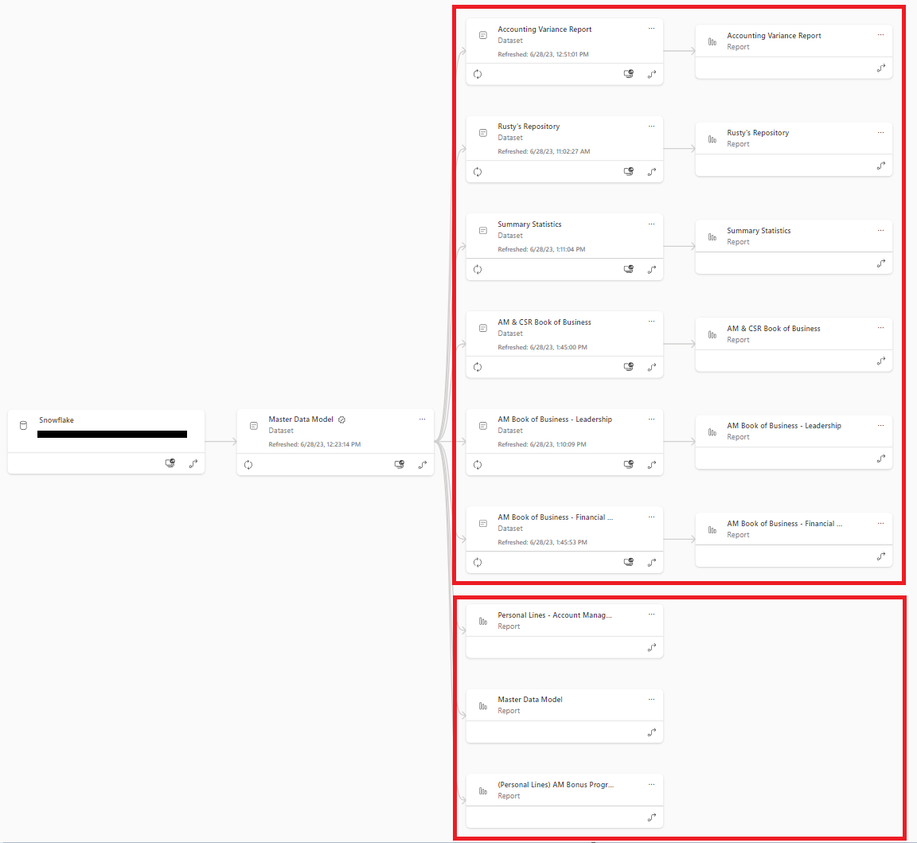
Michaelbean21_0-1687978310131.png


2 REPLIES 2
GilbertQ
Super User
Super User

Hi @Michaelbean21 


What can happen is that a user might connect via Analysis Services which then puts in the dataset, or it could be if the user clicked on Transform Data (which will then create a composite model which creates the dataset)


What happens if you open the PBIX do you see it as LiveConnection or DirectQuery?


Did I answer your question? Mark my post as a solution!

Proud to be a Super User!


Power BI Blog

The ones with the their own dataset are Direct Query.

Helpful resources

Announcements
New to Fabric survey Carousel

New to Fabric Survey

If you have recently started exploring Fabric, we'd love to hear how it's going. Your feedback can help with product improvements.

Power BI DataViz World Championships carousel

Power BI DataViz World Championships - June 2026

A new Power BI DataViz World Championship is coming this June! Don't miss out on submitting your entry.

Join our Fabric User Panel

Join our Fabric User Panel

Share feedback directly with Fabric product managers, participate in targeted research studies and influence the Fabric roadmap.

March Power BI Update Carousel

Power BI Community Update - March 2026

Check out the March 2026 Power BI update to learn about new features.

Top Solution Authors