FabCon is coming to Atlanta
Join us at FabCon Atlanta from March 16 - 20, 2026, for the ultimate Fabric, Power BI, AI and SQL community-led event. Save $200 with code FABCOMM.
Register now!- Power BI forums
- Get Help with Power BI
- Desktop
- Service
- Report Server
- Power Query
- Mobile Apps
- Developer
- DAX Commands and Tips
- Custom Visuals Development Discussion
- Health and Life Sciences
- Power BI Spanish forums
- Translated Spanish Desktop
- Training and Consulting
- Instructor Led Training
- Dashboard in a Day for Women, by Women
- Galleries
- Data Stories Gallery
- Themes Gallery
- Contests Gallery
- QuickViz Gallery
- Quick Measures Gallery
- Visual Calculations Gallery
- Notebook Gallery
- Translytical Task Flow Gallery
- TMDL Gallery
- R Script Showcase
- Webinars and Video Gallery
- Ideas
- Custom Visuals Ideas (read-only)
- Issues
- Issues
- Events
- Upcoming Events
The Power BI Data Visualization World Championships is back! Get ahead of the game and start preparing now! Learn more
- Power BI forums
- Forums
- Get Help with Power BI
- Service
- Re: PowerBI Service Scheduled refresh failed
- Subscribe to RSS Feed
- Mark Topic as New
- Mark Topic as Read
- Float this Topic for Current User
- Bookmark
- Subscribe
- Printer Friendly Page

- Mark as New
- Bookmark
- Subscribe
- Mute
- Subscribe to RSS Feed
- Permalink
- Report Inappropriate Content
PowerBI Service Scheduled refresh failed
Hi all,
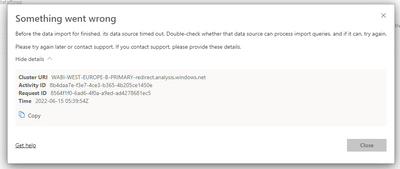
PowerBI Scheduled refresh fails with following message.
Cluster URI: WABI-WEST-EUROPE-B-PRIMARY-redirect.analysis.windows.net
Activity ID: 8b4daa7e-f3e7-4ce3-b365-4b205ce1450e
Request ID: 8564f1f0-6ad6-4f0a-a9ed-ad4278681ec5
Time: 2022-06-15 05:39:54Z
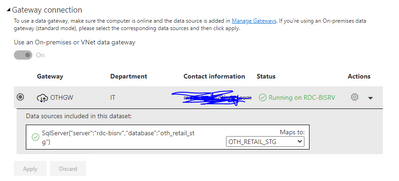
the Gateway connection seems fine
I appreciate your support
Solved! Go to Solution.


- Mark as New
- Bookmark
- Subscribe
- Mute
- Subscribe to RSS Feed
- Permalink
- Report Inappropriate Content
Hi @Anonymous ,
It seems that gateway is working fine, the problem may come from your data source
1 When the data refresh fails more than 4 times, it will cause a failure.
2 A total refresh time of more than two hours will cause the data refresh to fail.
Please consider optimizing the model by removing unnecessary columns to reduce the size of the dataset or consider using advanced capacity to reduce the refresh time.
Optimization guide for Power BI - Power BI | Microsoft Docs
Troubleshooting refresh scenarios - Power BI | Microsoft Docs
Best Regards
Community Support Team _ chenwu zhu
If this post helps, then please consider Accept it as the solution to help the other members find it more quickly.
- Mark as New
- Bookmark
- Subscribe
- Mute
- Subscribe to RSS Feed
- Permalink
- Report Inappropriate Content
UPDATE:
I opened a ticket with microsoft. After long investigation the issue was related to the internet bandwidth. the refresh was taking long time then failing.
I couldn't change the bandwidth, I reduced the file size from 650 mb to 570 mb. now the refresh is working fine. But i am still thinking how would i manage this when file size grows again to reach the 650+ mb. everyday i have a growth of about 800 kb. simple math says : i have about 3 months remaining. 😨
- Mark as New
- Bookmark
- Subscribe
- Mute
- Subscribe to RSS Feed
- Permalink
- Report Inappropriate Content
UPDATE:
I opened a ticket with microsoft. After long investigation the issue was related to the internet bandwidth. the refresh was taking long time then failing.
I couldn't change the bandwidth, I reduced the file size from 650 mb to 570 mb. now the refresh is working fine. But i am still thinking how would i manage this when file size grows again to reach the 650+ mb. everyday i have a growth of about 800 kb. simple math says : i have about 3 months remaining. 😨
- Mark as New
- Bookmark
- Subscribe
- Mute
- Subscribe to RSS Feed
- Permalink
- Report Inappropriate Content
I appreciate your support and time. My file size is about 600 mb. I think its not that big.
i optimized it but still have the same problem. maybe the issue is the internet connction. i will check with our admin and write you back. i also reviewed the Troubleshooting refresh scenarios - Power BI | Microsoft Docs . Nothing worked.
I will try to work on the upload speed for my internet with the admin and get back to you.
- Mark as New
- Bookmark
- Subscribe
- Mute
- Subscribe to RSS Feed
- Permalink
- Report Inappropriate Content
Hi @Anonymous ,
Whether the refresh is successful in power bi desktop?
Best Regards
Community Support Team _ chenwu zhu
- Mark as New
- Bookmark
- Subscribe
- Mute
- Subscribe to RSS Feed
- Permalink
- Report Inappropriate Content
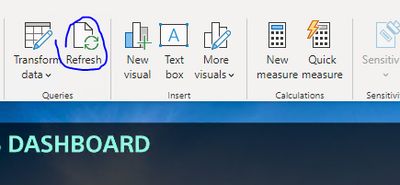
If I click the refresh button on the home tab, the refresh is successul.
so for your quesiton Whether the refresh is successful in power bi desktop? answer is Yes

- Mark as New
- Bookmark
- Subscribe
- Mute
- Subscribe to RSS Feed
- Permalink
- Report Inappropriate Content
Good morning, did you get it updated from the web?, I have the same problem, I update on desktop, but not on the web.
- Mark as New
- Bookmark
- Subscribe
- Mute
- Subscribe to RSS Feed
- Permalink
- Report Inappropriate Content
Hi @Anonymous ,
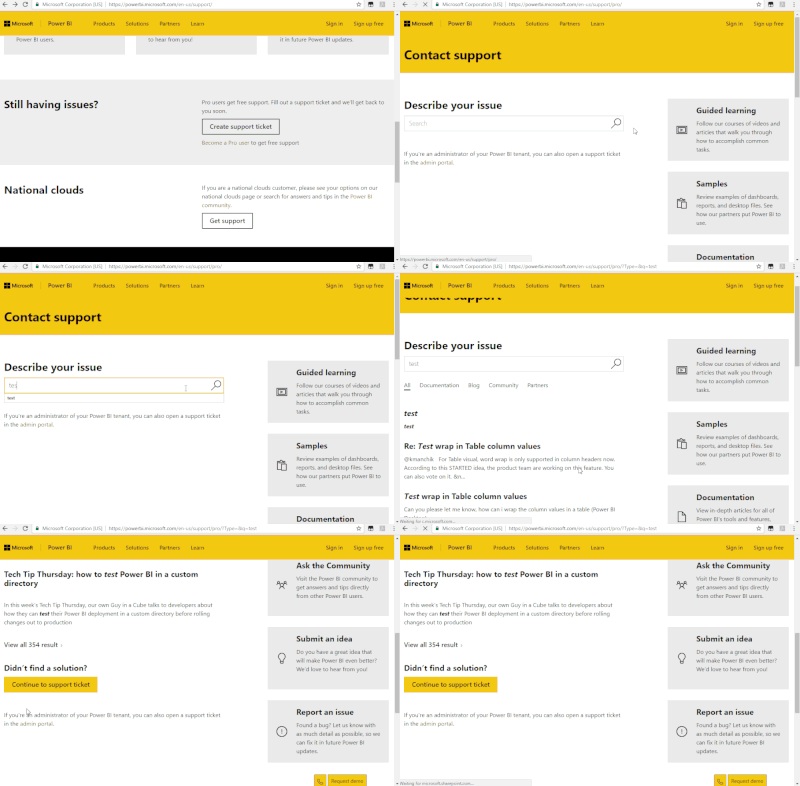
Ok, I can't reproduce your situation so recommend that you could create a support ticket.
Please refer to the gif how to create the support ticked.
Best Regards
Community Support Team _ chenwu zhu
- Mark as New
- Bookmark
- Subscribe
- Mute
- Subscribe to RSS Feed
- Permalink
- Report Inappropriate Content
Hi @Anonymous ,
It seems that gateway is working fine, the problem may come from your data source
1 When the data refresh fails more than 4 times, it will cause a failure.
2 A total refresh time of more than two hours will cause the data refresh to fail.
Please consider optimizing the model by removing unnecessary columns to reduce the size of the dataset or consider using advanced capacity to reduce the refresh time.
Optimization guide for Power BI - Power BI | Microsoft Docs
Troubleshooting refresh scenarios - Power BI | Microsoft Docs
Best Regards
Community Support Team _ chenwu zhu
If this post helps, then please consider Accept it as the solution to help the other members find it more quickly.
Helpful resources

Power BI Dataviz World Championships
The Power BI Data Visualization World Championships is back! Get ahead of the game and start preparing now!

Power BI Monthly Update - December 2025
Check out the December 2025 Power BI Holiday Recap!

FabCon Atlanta 2026
Join us at FabCon Atlanta, March 16-20, for the ultimate Fabric, Power BI, AI and SQL community-led event. Save $200 with code FABCOMM.


