
Don't miss your chance to take the Fabric Data Engineer (DP-600) exam for FREE! Find out how by attending the DP-600 session on April 23rd (pacific time), live or on-demand.
Learn moreNext up in the FabCon + SQLCon recap series: The roadmap for Microsoft SQL and Maximizing Developer experiences in Fabric. All sessions are available on-demand after the live show. Register now
Hi,
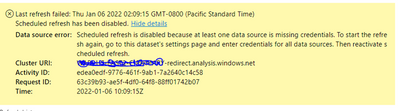
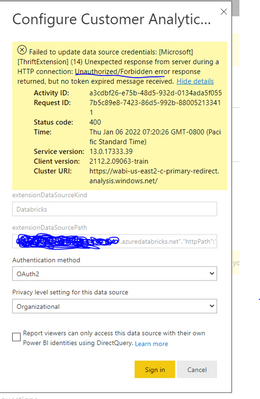
I developed a report with 2 datasources Azure datbricks and Sharepoint in Production Premium workspace. My report was refreshing fine without any issue until I had to change my windows password (Organization's protocol). After I changed the password my Azure databricks connection is not refreshed in the PowerBI service. I am able to connect and query the databricks without any issue. Suprisingly Iam able to refresh the same report in desktop version but the problem is with the refresh on PowerBI service.
I tried signing in different browsers with OAuth, Basic and AccountKey but nothing worked. I tired updating the credentials in desktop version and published it agian but still no use.
I am blocked with data refreshs on a production report which is very critical. Please help mw with this.
Here are the images with the connection error.
Hi @syasmeeen
Has your problem been solved ? If it has been solved, then please consider Accept it as the solution to help the other members find it more quickly.
Best Regard
Community Support Team _ Ailsa Tao
If this post helps, then please consider Accept it as the solution to help the other members find it more quickly.
Hi @syasmeeen
You need update your credentials in Manage gateways .
In order to ensure that the Service and the data source can be connected, we need to configure the data source on the Service, and we need to enter credentials during this process. So when you update your Windows password, you need to configure the data source to update credentials.
Best Regard
Community Support Team _ Ailsa Tao
If this post helps, then please consider Accept it as the solution to help the other members find it more quickly.
You will need to updtae the credentials in Power BI Service (in the gateway)
If you have recently started exploring Fabric, we'd love to hear how it's going. Your feedback can help with product improvements.
A new Power BI DataViz World Championship is coming this June! Don't miss out on submitting your entry.
Share feedback directly with Fabric product managers, participate in targeted research studies and influence the Fabric roadmap.