cancel
Showing results for 
Search instead for 
Did you mean: 

The Power BI Data Visualization World Championships is back! Get ahead of the game and start preparing now! Learn more

Reply
BM4291
Resolver I
Resolver I

PowerBI Paginated - Date Parameters use different locale

Hi,


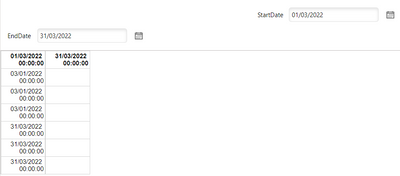
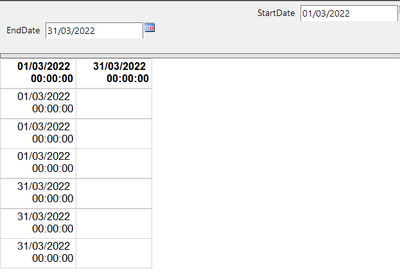
In the past week or so we've noticed some odd behaviour in a handful of paginated reports in the PowerBI service; they're displaying UK date formats (dd/MM/yyyy) to the user, however when rendering, the data is being filtered using US formats (MM/dd/yyyy).


I can run the reports fine locally in Paginated Report Builder and we're using the latest version.


The reports are DAX based and have tested using DATEVALUE/CONVERT in the query but both express the same in the service; any other ideas on how I can force the locale to UK here? Or anyone else experiencing this?

The below identifies this issue locally and in the service:


DEFINE

VAR s = DATEVALUE(@StartDate)
VAR e = DATEVALUE(@EndDate)
VAR s1 = CONVERT(@StartDate, DATETIME)
VAR e1 = CONVERT(@EndDate, DATETIME)

EVALUATE
{
	ROW("StartDate DATEVALUE", s)
	, ROW("StartDate CONVERT", s1)
	, ROW("StartDate Parameter", @StartDate)
	, ROW("EndDate DATEVALUE", e)
	, ROW("EndDate CONVERT", e1)
	, ROW("EndDate Parameter", @EndDate)
}


Local
BM4291_0-1649072441676.png


Service

BM4291_1-1649072487913.png

Service Payload

BM4291_2-1649072521369.png


***UPDATE***

I've come up with a workaround to use hidden parameters which force the locale to UK; this feels hacky but is allowing users to access data.

For each date, I have a hidden parameter i.e. StartDateHidden and this is formatted as: =FORMAT(CDATE(Parameters!StartDate.Value), "dd/MM/yyyy") and then it's this parameter being fed to DATEVALUE() in my DAX query.


Ideally this kind of step wouldn't be necessary!


1 ACCEPTED SOLUTION
BM4291
Resolver I
Resolver I

Thanks @Tutu_in_YYC ,

This error is slighlty different in that the values shown on the screen are in the correct locale, and are even passed back to the report in the correct format; it's that DATEVALUE() is then rendering them in a different locale despite the model, browser, and user being set to UK.


The workaround I've highlighted above does the trick for now.

View solution in original post

3 REPLIES 3
BM4291
Resolver I
Resolver I

Thanks @Tutu_in_YYC ,

This error is slighlty different in that the values shown on the screen are in the correct locale, and are even passed back to the report in the correct format; it's that DATEVALUE() is then rendering them in a different locale despite the model, browser, and user being set to UK.


The workaround I've highlighted above does the trick for now.

Thanks for the additional information!

Tutu_in_YYC
Super User
Super User

Hi BM,
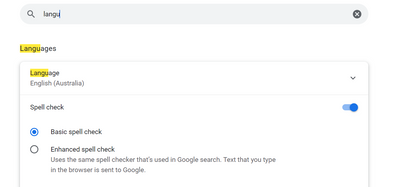
The date format in the service is dependant on the browser's language settings. I came across the same issues, but for the standard power bi reports. See if this helps?


Tutu_in_YYC_0-1649113742246.png


Helpful resources

Announcements
Power BI DataViz World Championships

Power BI Dataviz World Championships

The Power BI Data Visualization World Championships is back! Get ahead of the game and start preparing now!

November Power BI Update Carousel

Power BI Monthly Update - November 2025

Check out the November 2025 Power BI update to learn about new features.

FabCon Atlanta 2026 carousel

FabCon Atlanta 2026

Join us at FabCon Atlanta, March 16-20, for the ultimate Fabric, Power BI, AI and SQL community-led event. Save $200 with code FABCOMM.