cancel
Showing results for 
Search instead for 
Did you mean: 

July 7 - July 17 | Round 2 of the Power BI Dataviz World Championships. Don't miss your chance! Learn more

Reply
piyushj
Frequent Visitor

Power Bi Service Refresh - timeout expiration issue

Hi PBI Team,


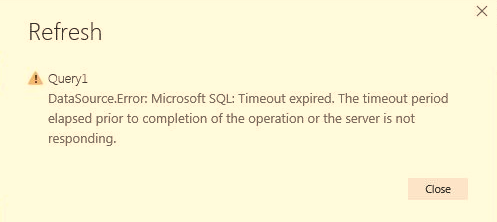
We are facing an issue in power bi service as well as in desktop app. We have huge amount of data available in tables (>10GB). We are importing data using SQL Server database. Previously, we have only 50k records but now it has more than 500millions rows. Now when we are trying to refresh the data, we are getting below error -

Power Bi Service (Screenshot Attached)Power Bi Service Refresh Issue.JPG

Power Bi Desktop Issue -

Desktop -Server Not Responding.JPG

Error Description -

Microsoft SQL: Timeout expired. The timeout period elapsed prior to completion of the operation or the server is not responding. This failure occurred while attempting to connect to the routing destination. The duration spent while attempting to connect to the original server was - [Pre-Login] initialization=217; handshake=664; [Login] initialization=0; authentication=0; [Post-Login] complete=217;


Appreciate your quick help on this.


25 REPLIES 25

Hi there

what do you mean by the duration parameter?


Did I answer your question? Mark my post as a solution!

Proud to be a Super User!


Power BI Blog

Anonymous
Not applicable

In your query source settings there's an option to specify a timeout that is longer than the default one. But it looks as though even doing that would not solve the problem a lot of people in this thread seem to be having because Power BI simply cannot handle such large sets.


I do find it surprising that in the age of "Big Data" things like this haven't been resolved. Just an hour so ago Excel completely fell over when I passed just 500K rows to it

Anonymous
Not applicable

@GilbertQ,


I mean the time out parameter that you set while connecting to any source.   You can see that in advance editor M code. 


 [Timeout=#duration(0, 0, 5, 0)])


Anonymous
Not applicable

I guess the timeout parameter can only be set if using SQL Server. But not sure if that will override the 5 hours timeout which is present on Power BI Service for any individual running query. Regards
Anonymous
Not applicable

I have this same issue.  What is the resolution?


Helpful resources

Announcements
FabCon and SQLCon Barcelona 2026

FabCon & SQLCon – Barcelona 2026

Join us in Barcelona for FabCon and SQLCon, the Fabric, Power BI, SQL, and AI community event. Save €200 with code FABCMTY200.

60 days of Data Days Carousel

Data Days 2026

Join Fabric Data Days 2026: 60 days of free live/on-demand sessions, challenges, study groups, and certification opportunities.

Power BI DataViz World Championships carousel

Power BI DataViz World Championships - June 2026

A new Power BI DataViz World Championship is coming this June! Don't miss out on submitting your entry.

Top Solution Authors