cancel
Showing results for 
Search instead for 
Did you mean: 

The Power BI Data Visualization World Championships is back! Get ahead of the game and start preparing now! Learn more

Reply
piyushj
Frequent Visitor

Power Bi Service Refresh - timeout expiration issue

Hi PBI Team,


We are facing an issue in power bi service as well as in desktop app. We have huge amount of data available in tables (>10GB). We are importing data using SQL Server database. Previously, we have only 50k records but now it has more than 500millions rows. Now when we are trying to refresh the data, we are getting below error -

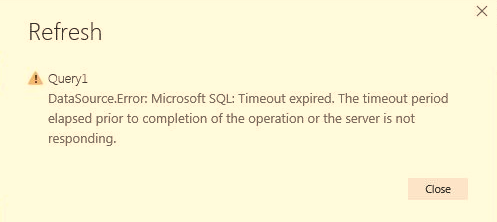
Power Bi Service (Screenshot Attached)Power Bi Service Refresh Issue.JPG

Power Bi Desktop Issue -

Desktop -Server Not Responding.JPG

Error Description -

Microsoft SQL: Timeout expired. The timeout period elapsed prior to completion of the operation or the server is not responding. This failure occurred while attempting to connect to the routing destination. The duration spent while attempting to connect to the original server was - [Pre-Login] initialization=217; handshake=664; [Login] initialization=0; authentication=0; [Post-Login] complete=217;


Appreciate your quick help on this.


25 REPLIES 25

Hi there

what do you mean by the duration parameter?


Did I answer your question? Mark my post as a solution!

Proud to be a Super User!


Power BI Blog

Anonymous
Not applicable

In your query source settings there's an option to specify a timeout that is longer than the default one. But it looks as though even doing that would not solve the problem a lot of people in this thread seem to be having because Power BI simply cannot handle such large sets.


I do find it surprising that in the age of "Big Data" things like this haven't been resolved. Just an hour so ago Excel completely fell over when I passed just 500K rows to it

Anonymous
Not applicable

@GilbertQ,


I mean the time out parameter that you set while connecting to any source.   You can see that in advance editor M code. 


 [Timeout=#duration(0, 0, 5, 0)])


Anonymous
Not applicable

I guess the timeout parameter can only be set if using SQL Server. But not sure if that will override the 5 hours timeout which is present on Power BI Service for any individual running query. Regards
Anonymous
Not applicable

I have this same issue.  What is the resolution?


Helpful resources

Announcements
Power BI DataViz World Championships

Power BI Dataviz World Championships

The Power BI Data Visualization World Championships is back! Get ahead of the game and start preparing now!

December 2025 Power BI Update Carousel

Power BI Monthly Update - December 2025

Check out the December 2025 Power BI Holiday Recap!

FabCon Atlanta 2026 carousel

FabCon Atlanta 2026

Join us at FabCon Atlanta, March 16-20, for the ultimate Fabric, Power BI, AI and SQL community-led event. Save $200 with code FABCOMM.