cancel
Showing results for 
Search instead for 
Did you mean: 

The Power BI Data Visualization World Championships is back! Get ahead of the game and start preparing now! Learn more

Reply
Makula9989
Frequent Visitor

Power BI schedule failed with the Below Error

Spoiler
 

Hi all,


I got a power BI report with Azure as a Data source Azure IaaS (SQL Server running as a virtual server in Azure).so I had installed the Enterprise gateway 


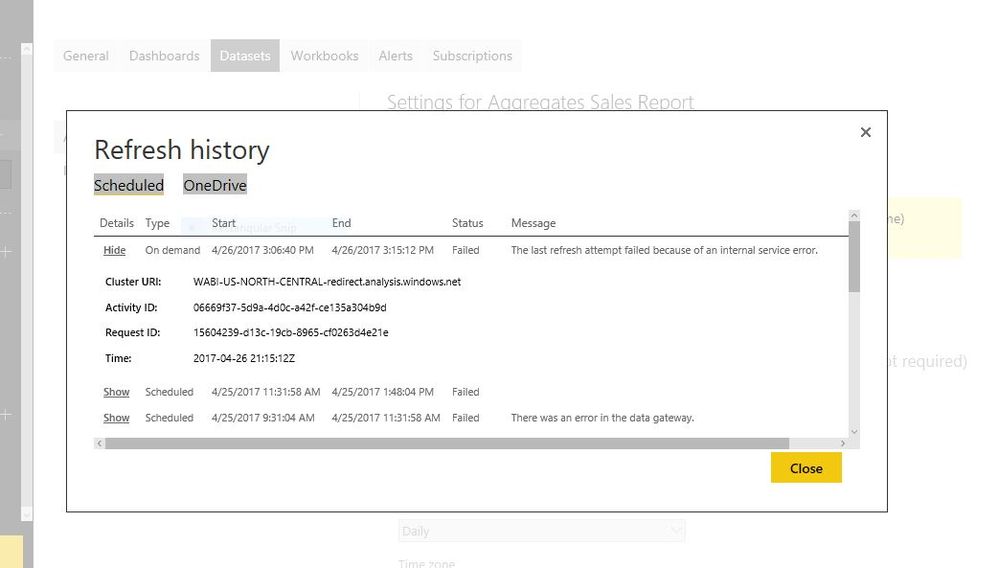
However, when I try to setup a daily scheduled refresh, I'm receiving the following error:


Note: all the credentials are working fine and its been Processing for some time and throwing the below error 


 Capture.JPG


Please let me know how to resolve this issue ??


Thanks

Mano

7 REPLIES 7
GilbertQ
Super User
Super User

Hi @Makula9989


Can you confirm if you have downloaded and installed the latest On-Premise Gateway?


They have created some great new features as well as tests to ensure that the connectivity is working as expected?

Also has anything changed in your network that could be affecting the Servers connectivity?


Power BI Gateways - March Update


Did I answer your question? Mark my post as a solution!

Proud to be a Super User!


Power BI Blog

Hi Guavaq,


As you suggest i had unistall the On premises gateway and installed the latest version and try to refresh but now got Capture.JPG


Hi @Makula9989


You can confirm that when you test the Data Source it does say that the connection is successful?


Did I answer your question? Mark my post as a solution!

Proud to be a Super User!


Power BI Blog

yes it is showing the two datasources as success and i had tried to refresh on demand and its running and after some time its throwing error 


Thanks

Mano

Hi @Makula9989


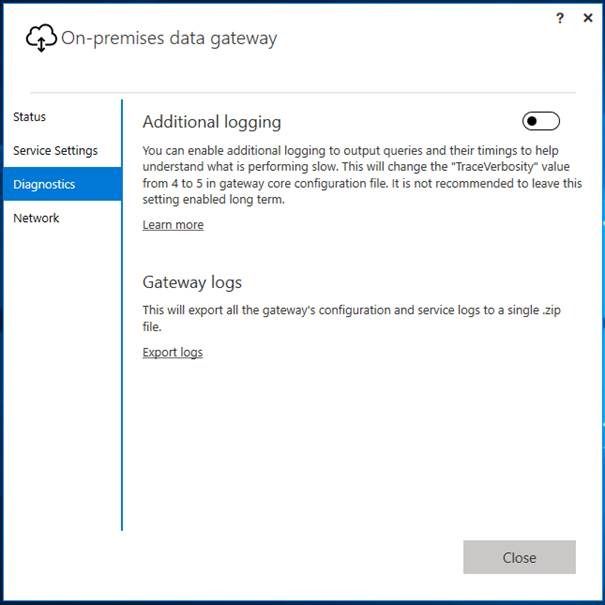
What I would then suggest is to enable the Verbose Logging to the Log File.


And then refresh and once it fails review the log file, as I am sure that there will be some information in there as to why it is failing.


Did I answer your question? Mark my post as a solution!

Proud to be a Super User!


Power BI Blog

Thanks for the Quick response guavaq


How to enable the enable the Verbose Logging to the Log File ..Is it in Power BI gateway ??

hi @Makula9989


Here is the offical blog post by Microsoft Power BI Team


Power BI Gateways–March Update


And here is where you can set the Verbose Logging


6be2e511-159b-4042-a03a-6ea0ffb410b9


Did I answer your question? Mark my post as a solution!

Proud to be a Super User!


Power BI Blog

Helpful resources

Announcements
Power BI DataViz World Championships

Power BI Dataviz World Championships

The Power BI Data Visualization World Championships is back! Get ahead of the game and start preparing now!

December 2025 Power BI Update Carousel

Power BI Monthly Update - December 2025

Check out the December 2025 Power BI Holiday Recap!

FabCon Atlanta 2026 carousel

FabCon Atlanta 2026

Join us at FabCon Atlanta, March 16-20, for the ultimate Fabric, Power BI, AI and SQL community-led event. Save $200 with code FABCOMM.