cancel
Showing results for 
Search instead for 
Did you mean: 

Level up your Power BI skills this month - build one visual each week and tell better stories with data! Get started

Reply
Anonymous
Not applicable

Power BI external guest user receiving login.live.com page error

We are testing granting external guest users access to our Power BI reports.  We have issued an invite to an external guest user with a Microsoft account and have granted their account rights to one of our internal Power BI Pro licenses.  We are federated with Microsoft.  The external guest user received the e-mail invite with the link to the report.  The first time they tried it, our ccompany authentication page sent them to Microsoft for authentication and then they were able to access the report.  Everytime since when they supply their credentials on our company authentication page they receive a "This login.live.com page can't be found" error.  They have tried using both Edge and Chrome and have also cleared caches etc.  In the details of the error message it says: "No webpage was found for the web address:  https://login.live.com/oauth20_authorize.srf?"

1 ACCEPTED SOLUTION
Anonymous
Not applicable

This is NOT a solution.  Don't mark is as one to pad your stats!  I worked with Microsoft Premiere Support and we were able to get the external access working.

View solution in original post

5 REPLIES 5
v-frfei-msft
Community Support
Community Support

Hi @Anonymous ,


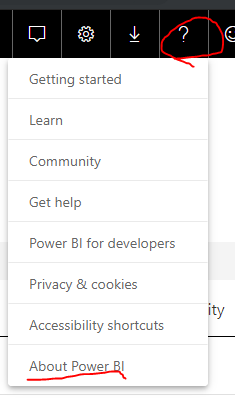
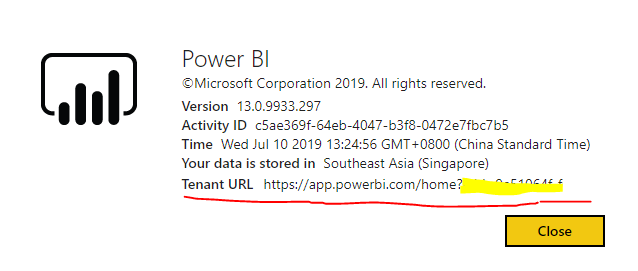
Based on my test, I cannot reproduce your issue here. Could you please share the Tenant URL to the external user to have a try.


p1.PNGP2.PNG


Community Support Team _ Frank
If this post helps, then please consider Accept it as the solution to help the others find it more quickly.
Anonymous
Not applicable

This is NOT a solution.  Don't mark is as one to pad your stats!  I worked with Microsoft Premiere Support and we were able to get the external access working.

I love it when the OP says the fixed their problem without providing any details.

Hello, what was the solution to this issue? I got similar issue today and not able to solve it. Thank you!

GilbertQ
Super User
Super User

I would suggest contacting your Azure AD Admin and asking them to see what the issue is via the logs.

It has been working for me with external customers without any issues.


Did I answer your question? Mark my post as a solution!

Proud to be a Super User!


Power BI Blog

Helpful resources

Announcements
April Power BI Update Carousel

Power BI Monthly Update - April 2026

Check out the April 2026 Power BI update to learn about new features.

Fabric SQL PBI Data Days

Data Days 2026 coming soon!

Sign up to receive a private message when registration opens and key events begin.

New to Fabric survey Carousel

New to Fabric Survey

If you have recently started exploring Fabric, we'd love to hear how it's going. Your feedback can help with product improvements.

Power BI DataViz World Championships carousel

Power BI DataViz World Championships - June 2026

A new Power BI DataViz World Championship is coming this June! Don't miss out on submitting your entry.