cancel
Showing results for 
Search instead for 
Did you mean: 

Learn from the best! Meet the four finalists headed to the FINALS of the Power BI Dataviz World Championships! Register now

Reply
Anonymous
Not applicable

Power BI analytics embedding using Java APP

Hello, I have downloaded sample java for Power BI analytics embedding, and followed link instruction as per link 

(https://github.com/microsoft/PowerBI-Developer-Samples/blob/master/Java/Embed%20for%20your%20custome...

). 


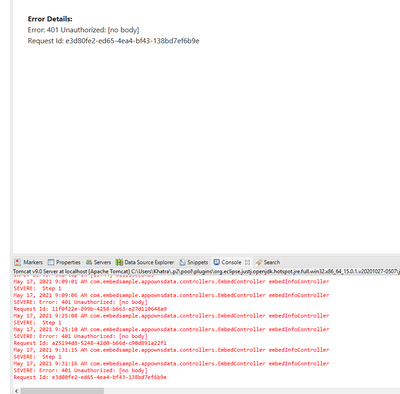
But whnei run app from eclipse, am getting an 401 unauthorized error when EmbedController is trying to get access token.  

I have registered a App in Azure AD, genearted client secret and updated client id, secret , tenant id in config.java. I have also add permissions for Power BI Service ( delegated permission without admin consent). 


Can someone help why i am still getting 401 error.  

Please review the error below. 

rajeshkhatri_0-1621270757796.png


1 ACCEPTED SOLUTION
Anonymous
Not applicable

Hi @Anonymous 

From your screenshot, I found that you use app owns data to embed for customer.

Your issue should be caused by authentication failed.

When you use app owns data, you should select authentication method firstly.(Service principal or Master user)

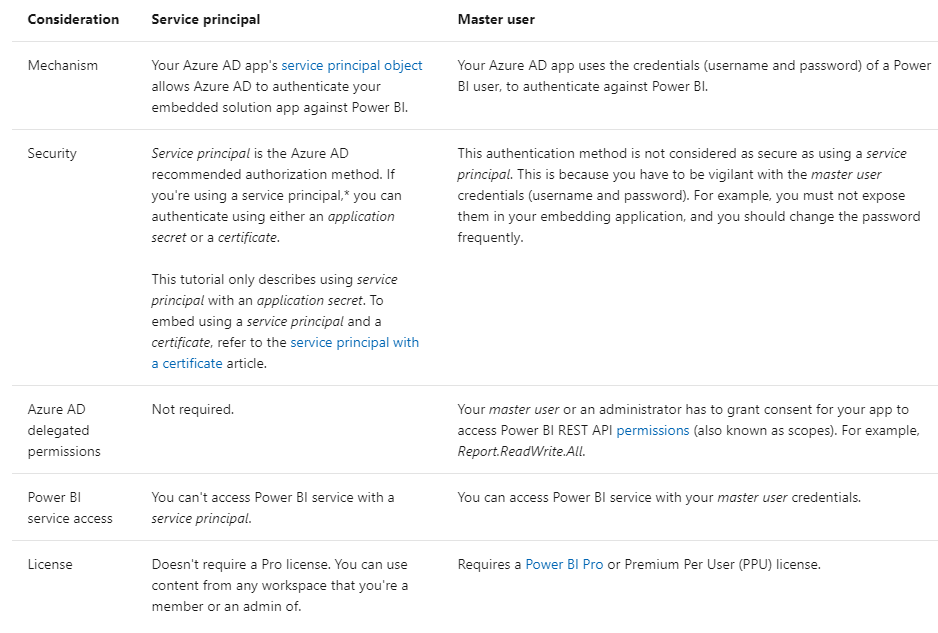
Differences between Service principal or Master user:
1.png

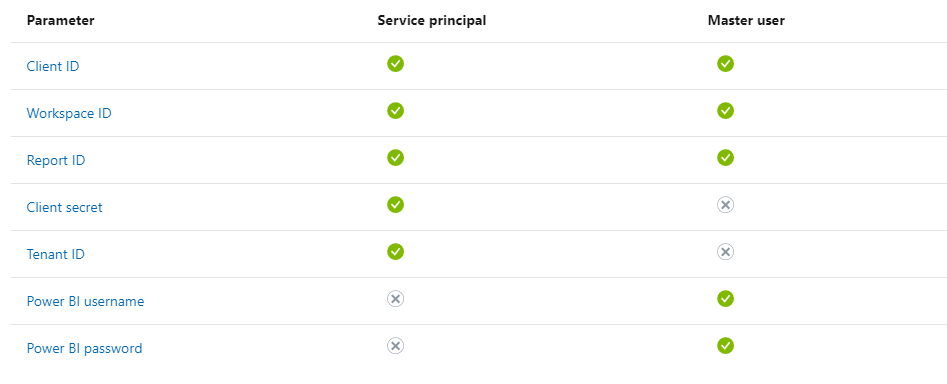
Please check which authentication method you use in your embed. By different authentication method, you need to configure your App in different way, you need to configure your PBI Service in different way and you will need different parameter in your code.

Parameter you need:
2.png

If you use Master user you need to grant API permission in Azure portal.

If you use Service principal, please check blogs as below.

For reference about how to configure Service principal. After you configure your Service principal, you need to build a security group in Azure portal and add this Service principal into this group. Then you need to enable Service principal access in admin portal (add security group into it). And you need to add your app into the workspace as a member. (If you use matser user, you need to add your account into the workspace as a member or admin)

You can download visual studio and use this sample to have a test. If you run succeed to run this sample in visual studio, you can embed for your customer successfully.

For more details about how to embed for customer.


Best Regards,

Rico Zhou


If this post helps, then please consider Accept it as the solution to help the other members find it more quickly. 


View solution in original post

1 REPLY 1
Anonymous
Not applicable

Hi @Anonymous 

From your screenshot, I found that you use app owns data to embed for customer.

Your issue should be caused by authentication failed.

When you use app owns data, you should select authentication method firstly.(Service principal or Master user)

Differences between Service principal or Master user:

1.png

Please check which authentication method you use in your embed. By different authentication method, you need to configure your App in different way, you need to configure your PBI Service in different way and you will need different parameter in your code.

Parameter you need:

2.png

If you use Master user you need to grant API permission in Azure portal.

If you use Service principal, please check blogs as below.

For reference about how to configure Service principal. After you configure your Service principal, you need to build a security group in Azure portal and add this Service principal into this group. Then you need to enable Service principal access in admin portal (add security group into it). And you need to add your app into the workspace as a member. (If you use matser user, you need to add your account into the workspace as a member or admin)

You can download visual studio and use this sample to have a test. If you run succeed to run this sample in visual studio, you can embed for your customer successfully.

For more details about how to embed for customer.


Best Regards,

Rico Zhou


If this post helps, then please consider Accept it as the solution to help the other members find it more quickly. 
 

Helpful resources

Announcements
Power BI DataViz World Championships carousel

Power BI DataViz World Championships - June 2026

A new Power BI DataViz World Championship is coming this June! Don't miss out on submitting your entry.

Join our Fabric User Panel

Join our Fabric User Panel

Share feedback directly with Fabric product managers, participate in targeted research studies and influence the Fabric roadmap.

March Power BI Update Carousel

Power BI Community Update - March 2026

Check out the March 2026 Power BI update to learn about new features.

Top Kudoed Authors