cancel
Showing results for 
Search instead for 
Did you mean: 

Get Fabric certified for FREE! Don't miss your chance! Learn more

Reply
ksabi
Advocate II
Advocate II

Power BI Service Filter vs Desktop (CSS bug?)

Hi everyone, 


Since the last week, i have noticed that the hehavior (css Style) of my filters on power bi service has changed. 

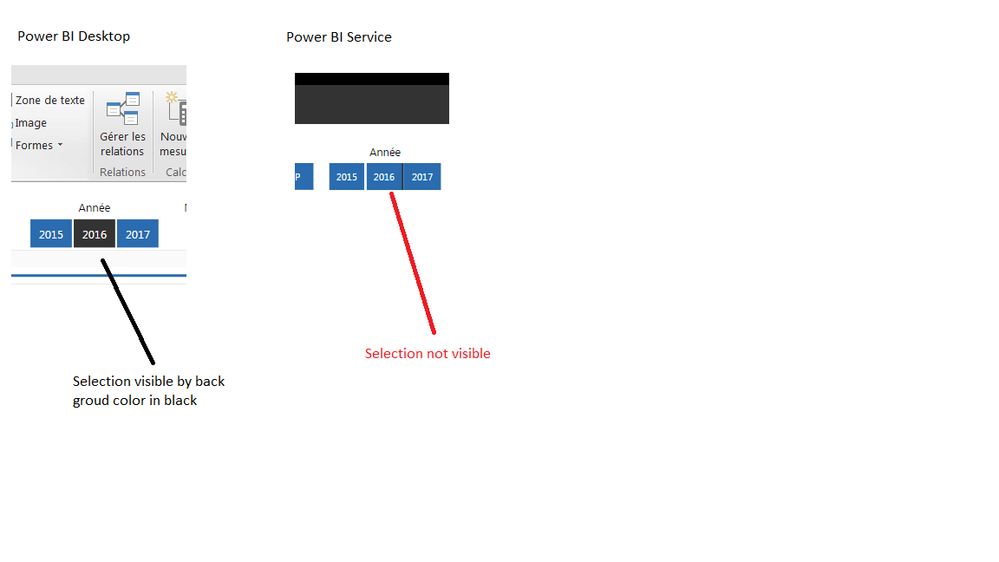
The problem is illustrated in the image below : 

Power BI filter Bug.png


In PBDesktop, the selected item in my filter is in black. I had the same behavior on the Service but, since the last week the back-ground color of the selection has disappeared.  


Is it a bug due to an update on the PBSevice? 


Thank you in advance. 


Khaled.

1 ACCEPTED SOLUTION
Anonymous
Not applicable

@ksabi This is most likely due to a Service update. Looks like there are several posts related to slicers in the issues forum. Add this as well if it isn't there. Others can vote up the issue there.

View solution in original post

1 REPLY 1
Anonymous
Not applicable

@ksabi This is most likely due to a Service update. Looks like there are several posts related to slicers in the issues forum. Add this as well if it isn't there. Others can vote up the issue there.

Helpful resources

Announcements
Join our Fabric User Panel

Join our Fabric User Panel

Share feedback directly with Fabric product managers, participate in targeted research studies and influence the Fabric roadmap.

Sticker Challenge 2026 Carousel

Join our Community Sticker Challenge 2026

If you love stickers, then you will definitely want to check out our Community Sticker Challenge!

January Power BI Update Carousel

Power BI Monthly Update - January 2026

Check out the January 2026 Power BI update to learn about new features.

FabCon Atlanta 2026 carousel

FabCon Atlanta 2026

Join us at FabCon Atlanta, March 16-20, for the ultimate Fabric, Power BI, AI and SQL community-led event. Save $200 with code FABCOMM.