Get certified for free when you join Fabric Data Days 2026 and dive into Fabric, Power BI, SQL, AI, and other essential data skills.
Join nowData Days is here! Join us now for 60+ days of learning, challenges, and connection. Learn more
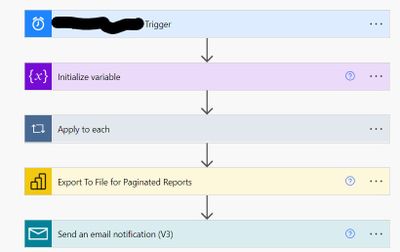
hi, I have a paginated report with a single parameter " Region". And I have created a Flow in Power Automate for the user subscription which looks like this
Now I had to add another parameter City in the paginated report. This flow stopped working.
Do I need to insert another "Apply to each" step for the second parameter? Or I can add another ser of the code Name: and Value: right below the Region Code?
Thanks
Solved! Go to Solution.
HI @BishwaR ,
Pls refer the following link:
https://powerusers.microsoft.com/t5/Get-Help-with-Power-Automate/ct-p/FL_GeneralDiscussions
Best Regards
Lucien
Hi @BishwaR ,
I also suggest you to create a post in power automate forum. And in power bi you should set Allow multiple values property for the parameter:https://docs.microsoft.com/en-us/power-bi/report-builder-parameters#bkmk_Report_Parameters
And if you need to Pass a report parameter in a URL , The format for a multi-value parameter is to repeat the parameter name for each value. please refer to the example in this document: https://docs.microsoft.com/en-us/power-bi/report-builder-url-pass-parameters#additional-examples
You also could check if the following article is helpful:
Best Regards
Lucien
Thank you so much. Could you please give me the link to Power Automate forum?
HI @BishwaR ,
Pls refer the following link:
https://powerusers.microsoft.com/t5/Get-Help-with-Power-Automate/ct-p/FL_GeneralDiscussions
Best Regards
Lucien
Don't miss out on Data Days, June 15 through August 7. Learn Fabric, Power BI, SQL, AI and more.
Check out the May 2026 Power BI update to learn about new features.
| User | Count |
|---|---|
| 15 | |
| 10 | |
| 10 | |
| 8 | |
| 7 |
| User | Count |
|---|---|
| 41 | |
| 37 | |
| 35 | |
| 29 | |
| 20 |