cancel
Showing results for 
Search instead for 
Did you mean: 

The Power BI Data Visualization World Championships is back! Get ahead of the game and start preparing now! Learn more

Reply
Anonymous
Not applicable

Postgresql shows refreshing error with Power Bi

HI 

I have Postgresql connection with Power Bi and it gives me below error while refreshing desktop version


"OLE DB or ODBC error: [DataSource.Error] PostgreSQL: 53300: too many connections for role" and "OLE DB or ODBC error: Exception from HRESULT: 0x80040E4E. An unexpected exception occurred." 


I do have 7 queries in Power Bi with connects to DB(Postgresql) and fetch value.


when i go to Data and refresh each query one by one manually it works but when i click on refresh in report it gives me above error. i do not have any other connection open except this power bi desktop file


can anyone help, big thanks in advance


1 ACCEPTED SOLUTION
GilbertQ
Super User
Super User

Hi @Anonymous 


It appears that the PostgreSQL does not like so many connections.


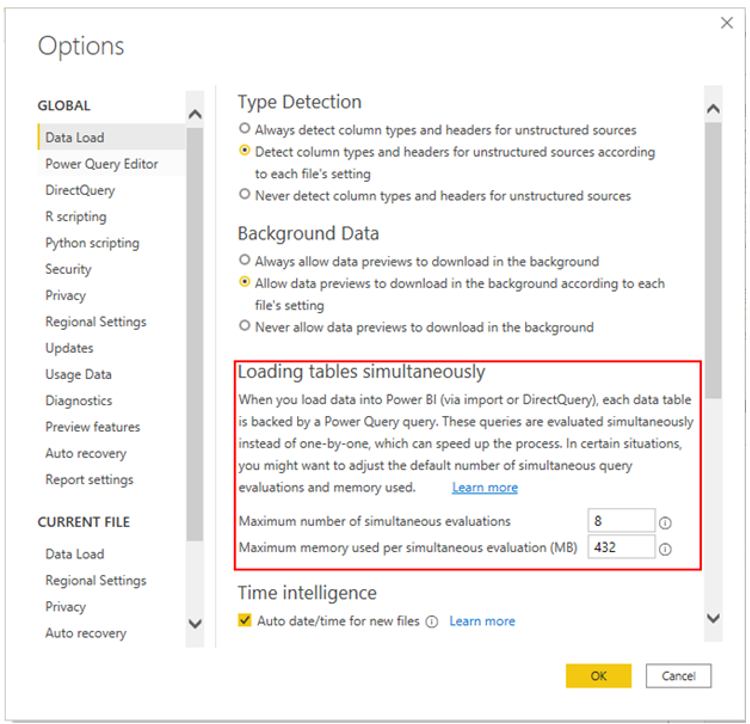
You can change how many connections run at one time by going into the settings in PBI Desktop and changing it as shown below to 1 for Simultaneous connections


GilbertQ_0-1631483378702.png


Did I answer your question? Mark my post as a solution!

Proud to be a Super User!


Power BI Blog

View solution in original post

6 REPLIES 6
GilbertQ
Super User
Super User

Hi @Anonymous 


It appears that the PostgreSQL does not like so many connections.


You can change how many connections run at one time by going into the settings in PBI Desktop and changing it as shown below to 1 for Simultaneous connections


GilbertQ_0-1631483378702.png


Did I answer your question? Mark my post as a solution!

Proud to be a Super User!


Power BI Blog

Anonymous
Not applicable

HI GilbertQ

Thanks for replying. so i have to change 8 to 1 ?

Yes if you could change that and see if it then works?


Did I answer your question? Mark my post as a solution!

Proud to be a Super User!


Power BI Blog

Anonymous
Not applicable

I tried and changed to 1 but it takes too much time to get refreshed and did not complete refresh 

Hi @Anonymous 


Thanks for the update.


If this is the case I would chat to your DBA to see how they can increase the number of concurrent connections to resolve this.


Did I answer your question? Mark my post as a solution!

Proud to be a Super User!


Power BI Blog

Anonymous
Not applicable

I do not know but I escalated to IT dept and they increased no of connection. and Problem solved but my team can not get refreshed result on web version


But thanks for your support

Helpful resources

Announcements
Power BI DataViz World Championships

Power BI Dataviz World Championships

The Power BI Data Visualization World Championships is back! Get ahead of the game and start preparing now!

December 2025 Power BI Update Carousel

Power BI Monthly Update - December 2025

Check out the December 2025 Power BI Holiday Recap!

FabCon Atlanta 2026 carousel

FabCon Atlanta 2026

Join us at FabCon Atlanta, March 16-20, for the ultimate Fabric, Power BI, AI and SQL community-led event. Save $200 with code FABCOMM.