Join us at FabCon Atlanta from March 16 - 20, 2026, for the ultimate Fabric, Power BI, AI and SQL community-led event. Save $200 with code FABCOMM.
Register now!The Power BI Data Visualization World Championships is back! Get ahead of the game and start preparing now! Learn more
Hello,
I have tried every combo of pivot, transpose, unpivot. I want my data to go from
| Product | Plant | Qty |
| 123 | US10 | 100 |
| 123 | US20 | 200 |
| 123 | US30 | 111 |
| 456 | US10 | 26 |
| 456 | US20 | 33 |
| 456 | US30 | 56 |
| 789 | US10 | 700 |
| 789 | US20 | 600 |
| 789 | US30 | 555 |
To this:
| Product | US10 | US20 | US30 |
| 123 | 100 | 200 | 111 |
| 456 | 22 | 33 | 56 |
| 789 | 700 | 600 | 555 |
Solved! Go to Solution.
Hi, @ethanlsaul ;
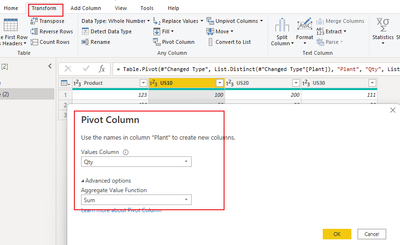
You could use pivot it.and the seting as follow:
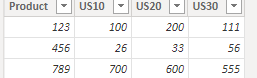
The final show:
Best Regards,
Community Support Team _ Yalan Wu
If this post helps, then please consider Accept it as the solution to help the other members find it more quickly.
Hi, @ethanlsaul ;
You could use pivot it.and the seting as follow:
The final show:
Best Regards,
Community Support Team _ Yalan Wu
If this post helps, then please consider Accept it as the solution to help the other members find it more quickly.
Hi @GilbertQ,
Thanks for replying. It worked, sort of!
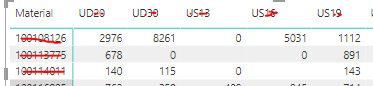
Do you know how i would go about replacing the blanks with 0's. The tricky part here is that the data isn't null for the missing column. 3rd row, 2nd line-- there isn't a line that contains anything in the raw data for that plant + item combo. I think it needs some sort of measure, but i have failed all week to figure it out. I wrote it here: Missing Data in inputs resulting in blanks on Matr... - Microsoft Power BI Community
Hi @ethanlsaul
What you could do is to create a measure and where it finds a blank to replace it with zero as shown with the example below
Qty (With Zeros) = IF(ISBLANK('Table Name'[Qty]),0,SUM('Table Name'[Qty]))
Not exactly-- it seems like in the field after isblank it needs another measure, which i dont have.
The Power BI Data Visualization World Championships is back! Get ahead of the game and start preparing now!
| User | Count |
|---|---|
| 56 | |
| 55 | |
| 32 | |
| 18 | |
| 14 |