cancel
Showing results for 
Search instead for 
Did you mean: 

Vote for your favorite vizzies from the Power BI Dataviz World Championship submissions. Vote now!

Reply
vasim07
Helper I
Helper I

Personal Gateway firewall problem.

Hi,


Personal Gateway works very well.

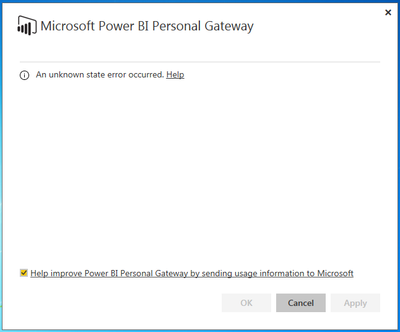
But when I'm connected to my organisation's network (internet) it stops working. I get the following error.


Capture.PNG


I spoke to my IT department, they told me its because of firewall protection and they need the path/url to unblock it. We tried adding app.powerbi.com but problem still persist.


Any help on what could be the issue/resolution.


Regards,

Vasim


3 REPLIES 3
mitsu
Resolver IV
Resolver IV

Power BI Personal Gateway communicates on outbound ports: TCP 443 (default), 5671, 5672, 9350 thru 9354. The Gateway does not require inbound ports. If you have these outbound ports open the Personal gateway should work well . 


You can find more details on the same on the following article


https://powerbi.microsoft.com/en-us/documentation/powerbi-personal-gateway/


Hope this helps !


Thanks,

Mitsu

Thanks Mitsu,


Upon checking 443 is not working on my network.

How do I change the default from 443 to 5671.


Port 5671 is open.


Thanks

I am not sure if there is a way to change the Outbound port . Would let someone else respond to this if they know a way to do so .


Regards,

Mitsu

Helpful resources

Announcements
Power BI DataViz World Championships

Power BI Dataviz World Championships

Vote for your favorite vizzies from the Power BI World Championship submissions!

Sticker Challenge 2026 Carousel

Join our Community Sticker Challenge 2026

If you love stickers, then you will definitely want to check out our Community Sticker Challenge!

January Power BI Update Carousel

Power BI Monthly Update - January 2026

Check out the January 2026 Power BI update to learn about new features.

FabCon Atlanta 2026 carousel

FabCon Atlanta 2026

Join us at FabCon Atlanta, March 16-20, for the ultimate Fabric, Power BI, AI and SQL community-led event. Save $200 with code FABCOMM.