cancel
Showing results for 
Search instead for 
Did you mean: 

The Power BI Data Visualization World Championships is back! Get ahead of the game and start preparing now! Learn more

Reply
tomhawley
Advocate I
Advocate I

Percentage Rounding Inaccurate in Gauge

I'm having a rounding issue with a Percentage measure based on two other measures visualised in a Gauge.


I have three measures:

Total MAs = COUNTROWS('RAMAData')

Total MAs Compliant = COUNTROWS(FILTER('RAMAData',[Policy Position] = "Not Yet Due"))

Current Percentage Compliant = [Total MAs Compliant]/[Total MAs]


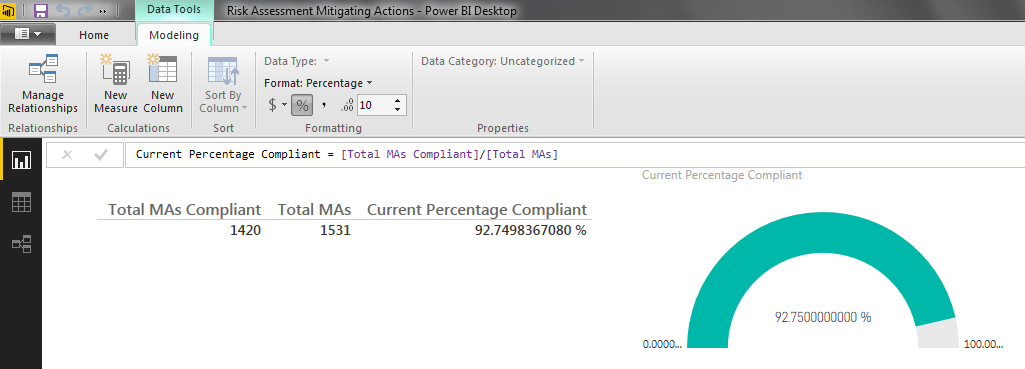
I want this to be calculated with full precision and then rounded only for visualisation. What I see happening and shown in the first image below is the table visualisation handling it correctly - 92.7% is a 1dp percentage from 1420/1531 = 0.92749836... The gauge however is showing 92.8%, which is simply wrong.


It conflicts with my existing Excel report and this will be noticed. Conflicting numbers breed distrust in one or both reports.


PercRound.png


In the second image you can see what I believe to be the cause. When setting the metric to a higher dp it becomes clear that somewhere within the gauge it has already been rounded. It has gone from 0.92749836... to 0.9275 (2dp for percentage or 4dp for decimal), which then tips it over and it gets rerounded to 0.928 (1dp for percentage or 3dp for decimal).


The later rounding I want to happen, but the earlier one doesn't seem like it should be there at all.


Have I missed anything, or is this a bug in gauge? Incidentally, this is all built in Desktop, but it looks the same in the Service.
 

PercRound.png


2 REPLIES 2
tomhawley
Advocate I
Advocate I

Could somebody from Microsoft please clarify, is this forum the appropriate place to raise issues such as the above or not? It certainly seemed to be during the pre-GA period, as posts clearly had "started" and "resolved" statuses, but this post has gone ignored for three weeks, barring an edit by an admin for no clear reason. This seems to be a genuine bug in the visualisation and requires attention - at very least acknowledgement! Am I to assume I should I be sending this to support instead of posting here now?


After a fairly short amount of time i'm becoming quickly disillusioned by the lack of focus on the basic funcitonality in favour of what feels like endless announcements of data linkages to more and more third party services that users such as myself (and i'd wager many others) just aren't going to use. I'm beginning to wonder if Power BI has clear enough direction on what it wants to be to make it a safe choice.

Anonymous
Not applicable

Hi @tomhawley,


Did you managed to solved this rouding issue ?


Helpful resources

Announcements
Power BI DataViz World Championships

Power BI Dataviz World Championships

The Power BI Data Visualization World Championships is back! Get ahead of the game and start preparing now!

December 2025 Power BI Update Carousel

Power BI Monthly Update - December 2025

Check out the December 2025 Power BI Holiday Recap!

FabCon Atlanta 2026 carousel

FabCon Atlanta 2026

Join us at FabCon Atlanta, March 16-20, for the ultimate Fabric, Power BI, AI and SQL community-led event. Save $200 with code FABCOMM.