Hi @rsangeetha
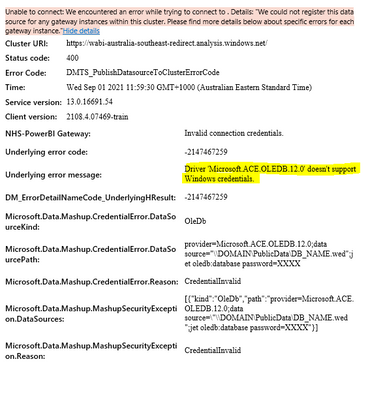
The 400 ERROR means a bad http request. Please update on-premise gateway to the lastest version. If you already have updated the gateway to the latest version, then you can refer to steps below for troubleshooting.
- Check if the server is using a proxy and the proxy. Some proxies restrict traffic to only ports 80 and 443. By default, communication to Azure Service Bus will occur on ports other than 443.
- You can force the gateway to communicate with Azure Service Bus using HTTPS instead of direct TCP. You will need to modify the Microsoft.PowerBI.DataMovement.Pipeline.GatewayCore.dll.config file. Change the value from AutoDetect to Https. This file is located, by default, at C:\Program Files\On-premises data gateway.
- Restart the gateway and check if the issue persists.
- To stop the service, run this command:
''' net stop PBIEgwService '''
- To start the service, run this command:
''' net start PBIEgwService '''
- You may export the data gateway log by selecting Diagnostics and then selecting the Export logs link near the bottom of the page.
Reference: https://docs.microsoft.com/en-us/power-bi/service-gateway-onprem-tshoot#tools-for-troubleshooting.
Best Regards
Community Support Team _ Ailsa Tao
If this post helps, then please consider Accept it as the solution to help the other members find it more quickly.