This time we’re going bigger than ever. Fabric, Power BI, SQL, AI and more. We're covering it all. You won't want to miss it.
Learn moreJoin the FabCon + SQLCon recap series. Up next: Power BI, Real-Time Intelligence, IQ and AI, and Data Factory take center stage. All sessions are available on-demand after the live show. Register now
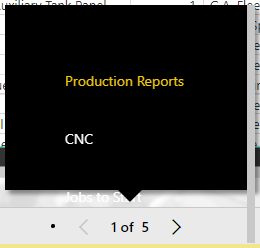
When you click the paging control at the botton of the screen to navigate to different pages of the report, the control looks wrong.
Solved! Go to Solution.
Hi @Anonymous,
This is an issue. But I can see that the fix has been deployed internally. Please wait for the deployment. It could take several days.
Best Regards,
Dale
What looks wrong? That looks like the correct control for a Publish to Web scenario.
The alignment and spacing of the items on the black pop up box are off. One of my users just called and pointed this out to me. There are actually 5 pages on this report...can't see the last page.
Yeah, it is definitely funky. Honestly, I'd never actually clicked on the middle of that control and seen that black pop-up until just now. I just page through one at a time.
Same here. It just so happens that this one user actually clicks on the middle of that control to get the box.
Hi @Anonymous,
This is an issue. But I can see that the fix has been deployed internally. Please wait for the deployment. It could take several days.
Best Regards,
Dale
Sounds good...thanks!
Check out the April 2026 Power BI update to learn about new features.
If you have recently started exploring Fabric, we'd love to hear how it's going. Your feedback can help with product improvements.
A new Power BI DataViz World Championship is coming this June! Don't miss out on submitting your entry.
| User | Count |
|---|---|
| 11 | |
| 10 | |
| 9 | |
| 8 | |
| 7 |
| User | Count |
|---|---|
| 49 | |
| 34 | |
| 27 | |
| 21 | |
| 20 |