Get certified for free when you join Fabric Data Days 2026 and dive into Fabric, Power BI, SQL, AI, and other essential data skills.
Join nowData Days is here! Join us now for 60+ days of learning, challenges, and connection. Learn more
Hi guys,
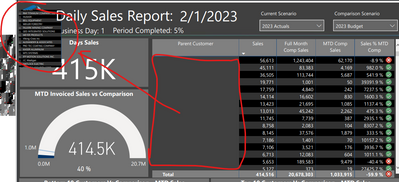
A bunch of reports when exported as PDF look messed up. See below:
Does anyone know how to resolve this please? Is there a way to force Power BI to export PDFs as images rather than text based?
Kind regards,
Sabil
I am having the same issue when exporting to PDF but the issue only occurs on Matrix tables and not on regular tables. Issue appears to have started for me between 2023-01-23 and 2023-01-30.
@AD_1 Thanks for replying. This is quite useful information as that's around the time we had the issue. So perhaps it's a PBI bug? Do you know if Microsoft are aware of this bug or how to inform them?
Hello,
I have checked today and my matrix tables that are exported to PDF all showed up correctly so I am not sure if this was magically fixed. Have a look at your reports.
Don't miss out on Data Days, June 15 through August 7. Learn Fabric, Power BI, SQL, AI and more.
Check out the May 2026 Power BI update to learn about new features.
| User | Count |
|---|---|
| 16 | |
| 10 | |
| 10 | |
| 8 | |
| 7 |
| User | Count |
|---|---|
| 40 | |
| 36 | |
| 34 | |
| 28 | |
| 20 |