Join us at FabCon Atlanta from March 16 - 20, 2026, for the ultimate Fabric, Power BI, AI and SQL community-led event. Save $200 with code FABCOMM.
Register now!Get Fabric Certified for FREE during Fabric Data Days. Don't miss your chance! Request now
Hello,
I am connected to a PBI Embedded Capacity with SSMS. When I try to go in the advanced properties, I get this error. I am the owner and administrator of the capacity. What am I doing wrong ?
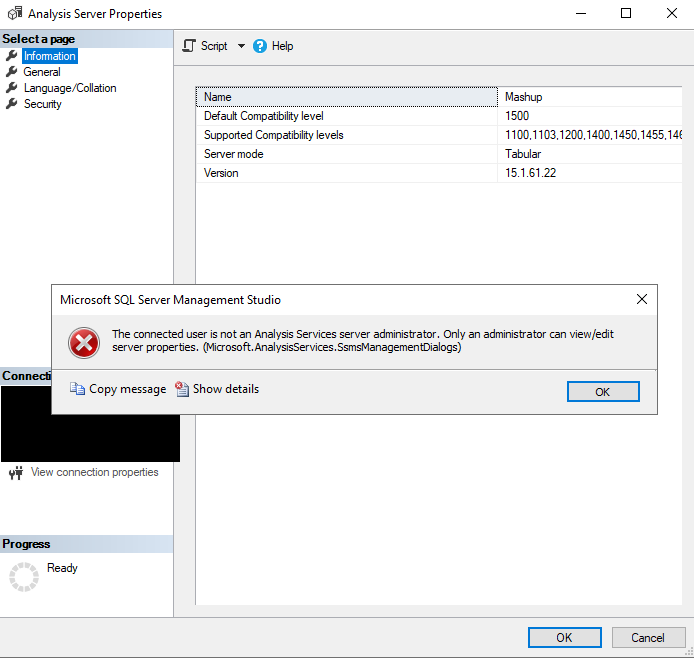
===================================
The connected user is not an Analysis Services server administrator. Only an administrator can view/edit server properties. (Microsoft.AnalysisServices.SsmsManagementDialogs)
------------------------------
Program Location:
at Microsoft.AnalysisServices.ManagementDialogs.CUtils.GetServerAsAdmin(IExDataContainer context)
at Microsoft.AnalysisServices.ManagementDialogs.ServerPropertiesGeneralPanel.InitProp()
at Microsoft.AnalysisServices.ManagementDialogs.ServerPropertiesGeneralPanel.OnInitialization()
at Microsoft.SqlServer.Management.SqlMgmt.ExPanelFormWrapper.OnInitialization()
at Microsoft.SqlServer.Management.SqlMgmt.ViewSwitcherControlsManager.SetView(Int32 index, TreeNode node)
at Microsoft.SqlServer.Management.SqlMgmt.ViewSwitcherControlsManager.OnBeforeSelection(Object sender, TreeViewCancelEventArgs e)
Hi @bergerlu
The error message indicates that you should also be the administrator of the Analysis Services server you are trying to edit, not an admin of a database or model. If you are already an admin of the AS server and see the error, you may exit SSMS application, right-click on SSMS and select Run As Administrator. If you are not an admin of it, you may ask the server admin to help add you as an admin. Please see the reference below about how to add a server admin:
Hope this helps.
Best Regards,
Community Support Team _ Jing Zhang
@v-jingzhang Thanks for your response, but those links you sent me seem to be for a local windows installation of Analysis Services.
What I am using is Power BI Embedded Capacity ressource that I created in Azure. Could you confirm that what I'm trying to do is actually supported by this type of server ?
Hi @bergerlu
Sorry I haven't found any documentation about modifying the DefaultSegmentRowCount property in Power BI Embedded Capacity. All I found is the DefaultSegmentRowCount property under VertiPaq Engine related to Power Pivot and SSAS. There are two articles about how it may influence the performance you may take for reference.
https://www.microsoftpressstore.com/articles/article.aspx?p=2449192&seqNum=4
https://www.purplefrogsystems.com/blog/2013/12/ssas-tabular-performance-defaultsegmentrowcount/
Best Regards,
Community Support Team _ Jing Zhang
By the way, what I'm trying to do is modify the DefaultSegmentRowCount property. Is this even supported on a pbi embedded capacity ?
Check out the November 2025 Power BI update to learn about new features.
Advance your Data & AI career with 50 days of live learning, contests, hands-on challenges, study groups & certifications and more!