Join us in Barcelona for FabCon and SQLCon, September 28 - October 1, 2026.
This is best Fabric, Power BI, SQL and AI community event. How do we know? The last event sold out! Save €200 with code FABCMTY200.
Register now- Power BI forums
- Get Help with Power BI
- Desktop
- Service
- Report Server
- Power Query
- Mobile Apps
- Developer
- DAX Commands and Tips
- Custom Visuals Development Discussion
- Health and Life Sciences
- Power BI Spanish forums
- Translated Spanish Desktop
- Training and Consulting
- Instructor Led Training
- Dashboard in a Day for Women, by Women
- Galleries
- Data Stories Gallery
- Themes Gallery
- Contests Gallery
- QuickViz Gallery
- Quick Measures Gallery
- Visual Calculations Gallery
- Fabric Apps Gallery
- Notebook Gallery
- Translytical Task Flow Gallery
- TMDL Gallery
- R Script Showcase
- Webinars and Video Gallery
- Ideas
- Custom Visuals Ideas (read-only)
- Issues
- Issues
- Events
- Upcoming Events
July 28 - August 9 | Final Round of the Power BI Dataviz World Championships. This is your chance. Learn more
- Power BI forums
- Forums
- Get Help with Power BI
- Service
- Re: On premise data gateway: SQL server authentica...
- Subscribe to RSS Feed
- Mark Topic as New
- Mark Topic as Read
- Float this Topic for Current User
- Bookmark
- Subscribe
- Printer Friendly Page


- Mark as New
- Bookmark
- Subscribe
- Mute
- Subscribe to RSS Feed
- Permalink
- Report Inappropriate Content
On premise data gateway: SQL server authentication error
I am getting the following error when I am creating a data source to connect to a sql server with a service account. But I am able to connect it with SQL server managment studio with same credentials. Below is the error:
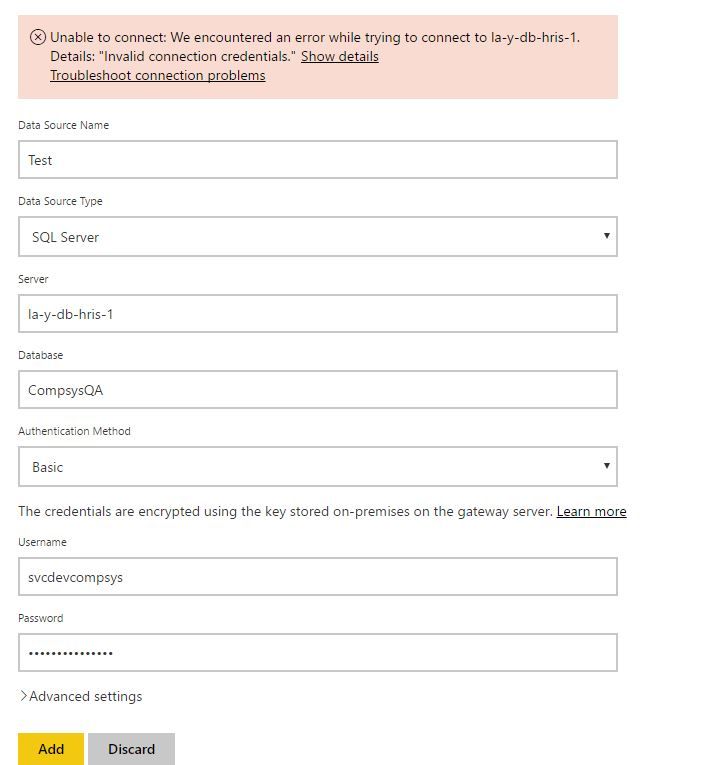
Unable to connect: We encountered an error while trying to connect to la-y-db-hris-1. Details: "Invalid connection credentials."Hide details
| Activity ID: | deddfac3-5cab-6d5b-8179-3e9b1c16f182 |
| Request ID: | c8dfbae4-b205-62ed-8c9d-69c54b3d3096 |
| Cluster URI: | https://wabi-west-us-redirect.analysis.windows.net |
| Status code: | 400 |
| Error Code: | DM_GWPipeline_Gateway_InvalidConnectionCredentials |
| Time: | Fri Apr 21 2017 14:48:20 GMT-0700 (Pacific Daylight Time) |
| Version: | 13.0.1700.1873 |
| Underlying error code: | -2146232060 |
| Underlying error message: | Login failed for user 'svcdevcompsys'. |
| DM_ErrorDetailNameCode_UnderlyingHResult: | -2146232060 |
| DM_ErrorDetailNameCode_UnderlyingNativeErrorCode: | 18456 |


- Mark as New
- Bookmark
- Subscribe
- Mute
- Subscribe to RSS Feed
- Permalink
- Report Inappropriate Content
Hi @mishrg,
1. Is the data gateway installed on the same machine as the SSMS exists?
2. Try to update the data gateway to the latest version.
3. Please share the image about the page of Manage Gateways where the error throws and credential section.
Best Regards,
Qiuyun Yu
If this post helps, then please consider Accept it as the solution to help the other members find it more quickly.
- Mark as New
- Bookmark
- Subscribe
- Mute
- Subscribe to RSS Feed
- Permalink
- Report Inappropriate Content
Answers for questions below:
1. Is the data gateway installed on the same machine as the SSMS exists? -- Yes, both are on the same machine.
2. Try to update the data gateway to the latest version. -- I tried but of no help.
3. Please share the imae about the page of Manage Gateways where the error throws and credential section. -- Image below. I have tried both with and without domain name in the user name. Also, have tried both basic and windows authentication.
- Mark as New
- Bookmark
- Subscribe
- Mute
- Subscribe to RSS Feed
- Permalink
- Report Inappropriate Content
Hi @mishrg,
It seems that the svcdevcompsys is a Windows account. When you create a SQL Server data source under data gateway, please set the Authentication as Windows instead of Basic. Then please enter the user name in the format of <Domain>\<user>, make sure the password is correct and not expired yet.
Best Regards,
Qiuyun Yu
If this post helps, then please consider Accept it as the solution to help the other members find it more quickly.
- Mark as New
- Bookmark
- Subscribe
- Mute
- Subscribe to RSS Feed
- Permalink
- Report Inappropriate Content
@v-qiuyu-msft I had tried that option and it gave the same error. svcdevcompsys password has not expired, same password is working with the SQL server management studio.
- Mark as New
- Bookmark
- Subscribe
- Mute
- Subscribe to RSS Feed
- Permalink
- Report Inappropriate Content
Hi @mishrg,
Regarding this issue, I would suggest you create a support ticket to let Microsoft engineers look into your local environment.
Best Regards,
Qiuyun Yu
If this post helps, then please consider Accept it as the solution to help the other members find it more quickly.

- Mark as New
- Bookmark
- Subscribe
- Mute
- Subscribe to RSS Feed
- Permalink
- Report Inappropriate Content
Hey,
Were you able to resolve this issue. I'm facing a similar problem with gateway authentication.
- Mark as New
- Bookmark
- Subscribe
- Mute
- Subscribe to RSS Feed
- Permalink
- Report Inappropriate Content
- Mark as New
- Bookmark
- Subscribe
- Mute
- Subscribe to RSS Feed
- Permalink
- Report Inappropriate Content
Adding to the point above, I am using windows authentication in SQL server management studio to login and here I have tried both windows and basic with no success.

Helpful resources

FabCon & SQLCon – Barcelona 2026
Join us in Barcelona for FabCon and SQLCon, the Fabric, Power BI, SQL, and AI community event. Save €200 with code FABCMTY200.

Power BI Monthly Update - July 2026
Check out the July 2026 Power BI update to learn about new features.

Power BI DataViz World Championships - June 2026
A new Power BI DataViz World Championship is coming this June! Don't miss out on submitting your entry.

| User | Count |
|---|---|
| 11 | |
| 10 | |
| 9 | |
| 5 | |
| 5 |


