Join us at FabCon Atlanta from March 16 - 20, 2026, for the ultimate Fabric, Power BI, AI and SQL community-led event. Save $200 with code FABCOMM.
Register now!The Power BI Data Visualization World Championships is back! Get ahead of the game and start preparing now! Learn more
Hi,
i have a dataflow in Power BI service which has a data source from sharepoint.
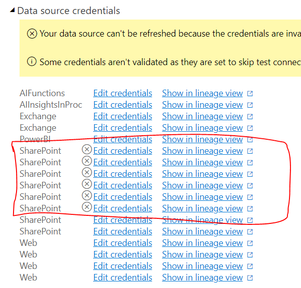
However, we have changed the sharepoint site and it has been updated in the power query, the stange thing is from the "Data source credentials" setting, i can still see these old sharepoint (even it is not used in power query and the site has been removed already).
The refresh of the data souce is still working and when i try to update the credentials for these old sharepoint, i received the following error message (which makes sense since these old sharepoint sites have been removed).
Failed to update data source credentials: Microsoft.Mashup.Engine1.Library.Resources.HttpResource: Request failed: OData Version: 3 and 4, Error: The remote server returned an error: (404) Not Found. (404 FILE NOT FOUND) OData Version: 4, Error: The remote server returned an error: (404) Not Found. (404 FILE NOT FOUND) OData Version: 3, Error: The remote server returned an error: (404) Not Found. (404 FILE NOT FOUND)
Any idea on how to remove these outdated credentials? thanks in advance.
Best,
Xiang
Solved! Go to Solution.
Hi @Hakun_Matata ,
I think we cannot remove datasources from Dataflows. A workaround is to download the JSON, then import the model again (it will duplicate your dataflow, but without those old data source). But you have to alter subsequent dataflows which reference this one.
Best Regards,
Winniz
If this post helps, then please consider Accept it as the solution to help the other members find it more quickly.
Hi @Hakun_Matata ,
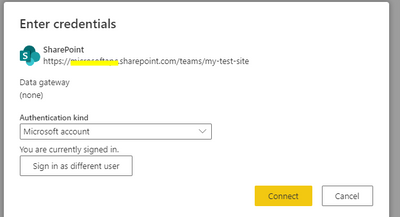
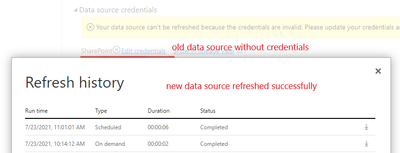
When I modify the data source to a new SharePoint site in the Advanced Editor, there will be the following prompt. After entering the new credentials, the refresh will be successful without editing the old data source credentials.
If the problem is still not resolved, please provide detailed error information or the expected result you expect. Let me know immediately, looking forward to your reply.
Best Regards,
Winniz
If this post helps, then please consider Accept it as the solution to help the other members find it more quickly.
Hi Winniz,
This is exactly what i have experienced, the dataflow is still working without any issue but i am wondering if its possible to remove these old data source since it doesnt look good...
Best,
Xiang
Hi @Hakun_Matata ,
I think we cannot remove datasources from Dataflows. A workaround is to download the JSON, then import the model again (it will duplicate your dataflow, but without those old data source). But you have to alter subsequent dataflows which reference this one.
Best Regards,
Winniz
If this post helps, then please consider Accept it as the solution to help the other members find it more quickly.
The Power BI Data Visualization World Championships is back! Get ahead of the game and start preparing now!
Check out the November 2025 Power BI update to learn about new features.