
Join us at FabCon Atlanta from March 16 - 20, 2026, for the ultimate Fabric, Power BI, AI and SQL community-led event. Save $200 with code FABCOMM.
Register now!The Power BI Data Visualization World Championships is back! Get ahead of the game and start preparing now! Learn more
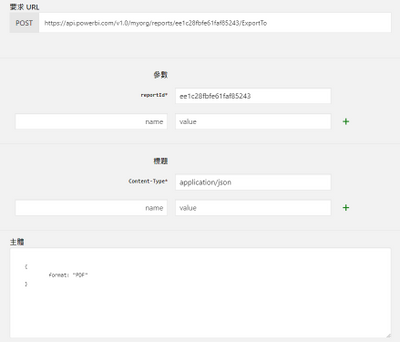
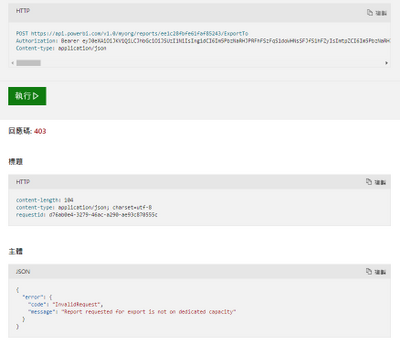
I am trying the API (Reports - Export To File) on the microsoft webpage and got the HTTP code 403, do anyone know why?
I already consented the related permissions on the account, and I am using pro license.
Do I need to consent more permission or need a premium license to do so?
Thank you.
Solved! Go to Solution.
Hi, @phchu1226
If you are referring to the exportToFile API, please check this related document.
https://docs.microsoft.com/en-us/power-bi/developer/embedded/export-to
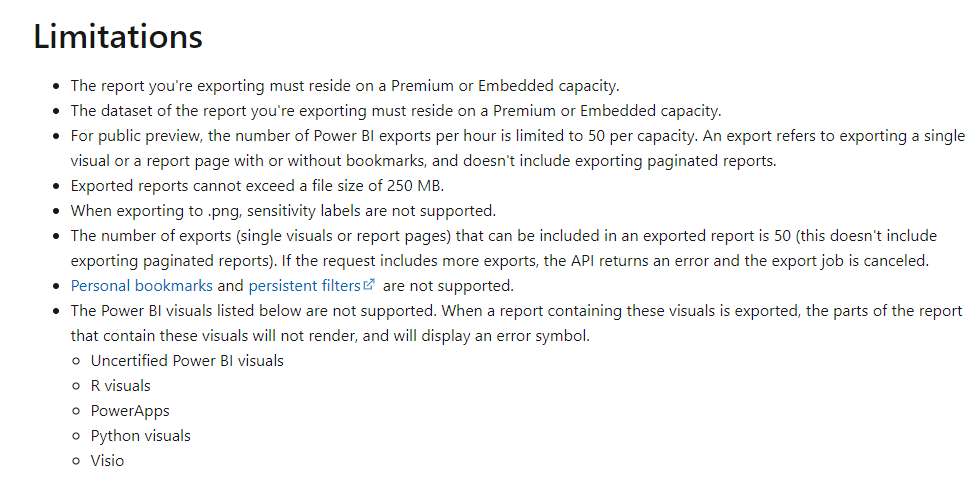
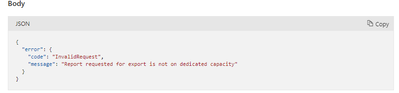
The feature is still in preview and is limited to Premium capacities.
Best Regards,
Community Support Team _ Eason
Hi @v-easonf-msft,
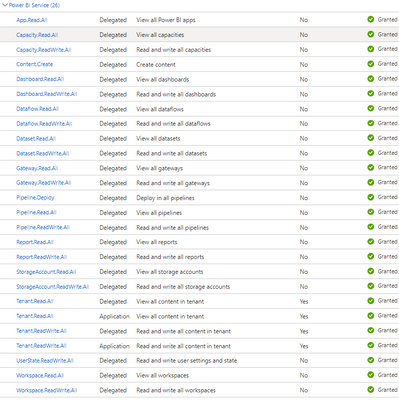
Checked the authorization token, granted all permission of PowerBI Service as below.
Then, I tried the RESTful API "Report - Export To File" again, the respond code is still 403..
May I know is it the limitation of "Pro" license, I need to purchase a "Premium" license in order to do so?
Thanks.
Calvin
Hi, @phchu1226
If you are referring to the exportToFile API, please check this related document.
https://docs.microsoft.com/en-us/power-bi/developer/embedded/export-to
The feature is still in preview and is limited to Premium capacities.
Best Regards,
Community Support Team _ Eason
Hi, @phchu1226
Please check the authorization token. You need to contacted your administrator and asked him to grant permissions to the token.
For more details, you can refer to this same topic in the developer forum.
Access-token-lacks-authorisation
Best Regards,
Community Support Team _ Eason
The Power BI Data Visualization World Championships is back! Get ahead of the game and start preparing now!
Check out the November 2025 Power BI update to learn about new features.