Don't miss your chance to take exam DP-600 or DP-700 on us!
Request nowLearn from the best! Meet the four finalists headed to the FINALS of the Power BI Dataviz World Championships! Register now
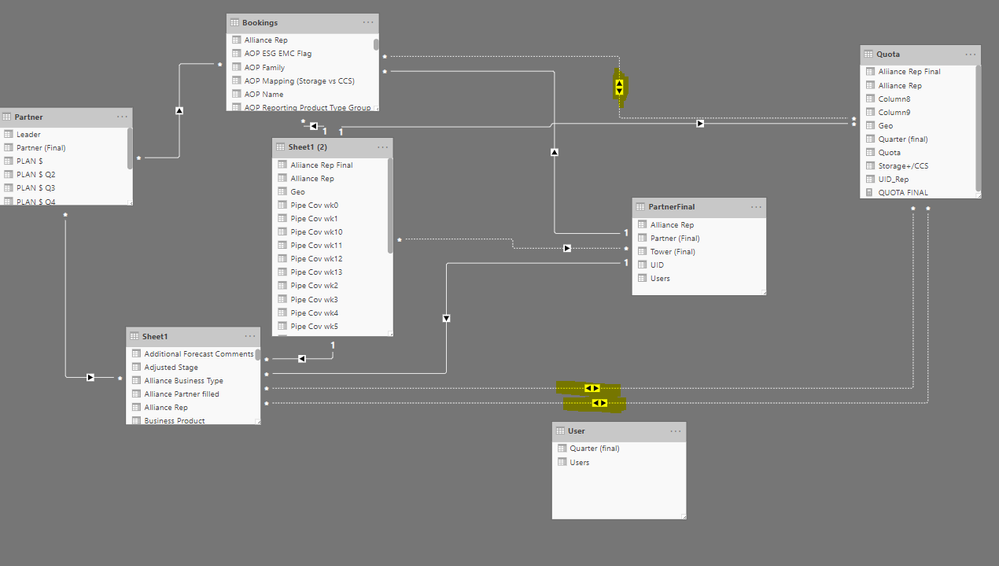
Highlighted are the inactive relationship that UserRelationships were created
Hi All
Per attached, i have created relationsips between multiple tables. The intention is to use slicers from sheet 1 "Sheet1[Quarter (final)] & "Sheet1 [Storage+/CCS]" to sum up the quota in table "Quota" based on the filters set in Table "Sheet 1" . i had created a new measure.
QUOTA FINAL = CALCULATE(SUM(Quota[Quota]),USERELATIONSHIP(Sheet1[Storage+/CCS],Quota[Storage+/CCS]),USERELATIONSHIP(Sheet1[Quarter (final)],Quota[Quarter (final)]))
It returns with an error message "there are ambiguous between 'Quota' and 'Sheet1': 'Quota'->'Sheet1' and 'Quota'->'Sheet1'.
Instead of have multiple slicers i wanted to use slicer from Sheet 1 to control all the tables. Appreciate if you can advise where went wrong or any other solution to this?
Solved! Go to Solution.
hi, @Anonymous
For your logic of yor formula, there will be two relationships between sheet1 and Quota when doing the calculation.
It is wrong in dax.
And I think for your requirement, you could try this way:
add a new column in sheet1 that combine Sheet1[Storage+/CCS] and Sheet1[Quarter (final)]
and add a new column in Quota that combine Quota[Storage+/CCS] and Quota[Quarter (final)].
Then create a relationship between Sheet1 and Quota by this new column instead of two old relationships.
Best Regards,
lin
hi, @Anonymous
For your logic of yor formula, there will be two relationships between sheet1 and Quota when doing the calculation.
It is wrong in dax.
And I think for your requirement, you could try this way:
add a new column in sheet1 that combine Sheet1[Storage+/CCS] and Sheet1[Quarter (final)]
and add a new column in Quota that combine Quota[Storage+/CCS] and Quota[Quarter (final)].
Then create a relationship between Sheet1 and Quota by this new column instead of two old relationships.
Best Regards,
lin
Share feedback directly with Fabric product managers, participate in targeted research studies and influence the Fabric roadmap.
Check out the February 2026 Power BI update to learn about new features.