
Join us at FabCon Atlanta from March 16 - 20, 2026, for the ultimate Fabric, Power BI, AI and SQL community-led event. Save $200 with code FABCOMM.
Register now!The Power BI Data Visualization World Championships is back! Get ahead of the game and start preparing now! Learn more
Does anyone know how to find out who performed a XMLA Read Operation against a dataset that caused my CPU to be overloaded for about 5 hours. The Premium Capacity Usage and Resource Utilization report indicated which dataset and at what time the overload occurred, but it will only tell the count of users. And looking into the data model, it doesn't capture individual user IDs.
And it appears that the Power BI audit logs don't capture XMLA Read Operations as an Operation to be tracked.
Any guidance on where to look is greatly appreciated.
Thanks
Solved! Go to Solution.
Hi,
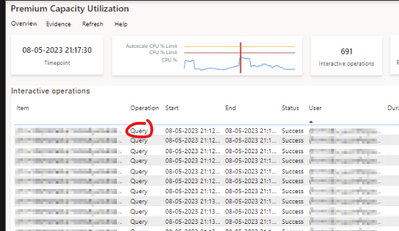
The Gen2 Metrics App will show you XMLA Read Operation, including the user running the queries.
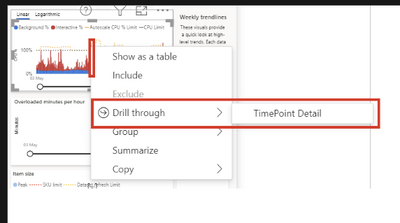
Use the drill trough TimePoint detail function to view operations at high CPU consumption period.
The screenshot above only shows "Query" but "XMLA Read Operation" will also be there if applicable.
Hope this helps!
Jeroen
Hi,
The Gen2 Metrics App will show you XMLA Read Operation, including the user running the queries.
Use the drill trough TimePoint detail function to view operations at high CPU consumption period.
The screenshot above only shows "Query" but "XMLA Read Operation" will also be there if applicable.
Hope this helps!
Jeroen
Could you find a solution yet? I am facing the same issue.
I haven't found a solution yet. Seems like a big miss on Microsoft's part.
Hi @cperuski
after some research I was able to identify my users using the Power BI cmdltets to get the activity log
The activity log does not explicitly point out XMLA reads, but since there are only so many applications that cause XMLA reads it helped narrow down the search.
Because it was a reoccuring issue for me, I then also used the SQL Server Profiler during the hours when the overloading occured to get more specific information.
I hope this helps you
I checked the internal icm, and there is indeed an issue that refreshes the CPU overload, which is still under investigation. ICM:295858845 If there is any news, I will update it here.
But for your question, there seems to be no way to find out who did it.
Best Regards,
Community Support Team _ Janey
Hi, @cperuski
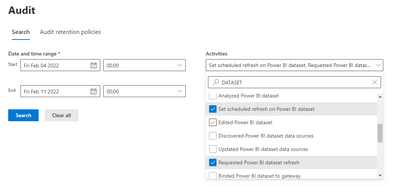
Although the XMLA operation can't be found in the audit log, but through the overloaded time, specific datasets, and certain operations of searching the dataset, the search target can be narrowed down in a large range, and then the related users can be found.
Audit log:
https://compliance.microsoft.com/auditlogsearch
Did I answer your question? Please mark my reply as solution. Thank you very much.
If not, please feel free to ask me.
Best Regards,
Community Support Team _ Janey
Check out the November 2025 Power BI update to learn about new features.
Advance your Data & AI career with 50 days of live learning, contests, hands-on challenges, study groups & certifications and more!