cancel
Showing results for 
Search instead for 
Did you mean: 

We've captured the moments from FabCon & SQLCon that everyone is talking about, and we are bringing them to the community, live and on-demand. Starts on April 14th. Register now

Reply
khanh_nguyen123
Frequent Visitor

Need help about Schedule Refresh Data Gateway error

 Hi @All,

I searched many relevant posts but my problem hasnt been resolved.

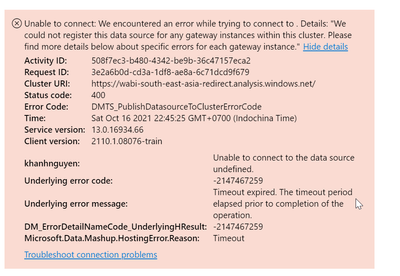
I managed to set up schedule refresh from Amazon Redshift datasource before and it did refresh smoothly. Recently, the scheduled was failed (although I didn't make any changes to the set up):

khanh_nguyen123_0-1634401774562.png

Then, I did uninstall On-premises gateway latest version and re-install, sign in the same database credentials but still same error.


Pls help me with this. Thanks in advance. 

1 ACCEPTED SOLUTION
Anonymous
Not applicable

Hi @khanh_nguyen123 ,


Refer to this link on how to update on premise gateway:

https://docs.microsoft.com/en-us/data-integration/gateway/service-gateway-update 


Download the latest gateways(I think this is the latest one) from links provided here:

https://powerbi.microsoft.com/en-us/blog/on-premises-data-gateway-april-2020-update-is-now-available...


You can also refer to solution of below thread to know how to install/update:

https://community.powerbi.com/t5/Desktop/Update-to-new-gateway/td-p/818241 

View solution in original post


Best Regards

Community Support Team _ polly


If this post helps, then please consider Accept it as the solution to help the other members find it more quickly.

View solution in original post

2 REPLIES 2
Anonymous
Not applicable

Hi @khanh_nguyen123 ,


Refer to this link on how to update on premise gateway:

https://docs.microsoft.com/en-us/data-integration/gateway/service-gateway-update 


Download the latest gateways(I think this is the latest one) from links provided here:

https://powerbi.microsoft.com/en-us/blog/on-premises-data-gateway-april-2020-update-is-now-available...


You can also refer to solution of below thread to know how to install/update:

https://community.powerbi.com/t5/Desktop/Update-to-new-gateway/td-p/818241 

View solution in original post


Best Regards

Community Support Team _ polly


If this post helps, then please consider Accept it as the solution to help the other members find it more quickly.

GilbertQ
Super User
Super User

Hi @khanh_nguyen123 


From your error it appears that there is a connectivity issue connecting to the Redshift database. If you can make sure you can log into your redshift database from your On-Premise server?


Did I answer your question? Mark my post as a solution!

Proud to be a Super User!


Power BI Blog

Helpful resources

Announcements
New to Fabric survey Carousel

New to Fabric Survey

If you have recently started exploring Fabric, we'd love to hear how it's going. Your feedback can help with product improvements.

Power BI DataViz World Championships carousel

Power BI DataViz World Championships - June 2026

A new Power BI DataViz World Championship is coming this June! Don't miss out on submitting your entry.

Join our Fabric User Panel

Join our Fabric User Panel

Share feedback directly with Fabric product managers, participate in targeted research studies and influence the Fabric roadmap.

March Power BI Update Carousel

Power BI Community Update - March 2026

Check out the March 2026 Power BI update to learn about new features.