Join us at FabCon Atlanta from March 16 - 20, 2026, for the ultimate Fabric, Power BI, AI and SQL community-led event. Save $200 with code FABCOMM.
Register now!The Power BI Data Visualization World Championships is back! Get ahead of the game and start preparing now! Learn more
I'm still a newby..I'm working on a project and there's something I need your help with. I need to multiply the sum total of city with 4.11 and also with 5.0. ..How do I achieve this??
I want these values to display bar charts side by side correctly in this same bar chart. Maybe only want it done with one measure . What expression or query can do this??..Also Can it be done with column as I have not used column before.
See attached
Solved! Go to Solution.
Hi ,
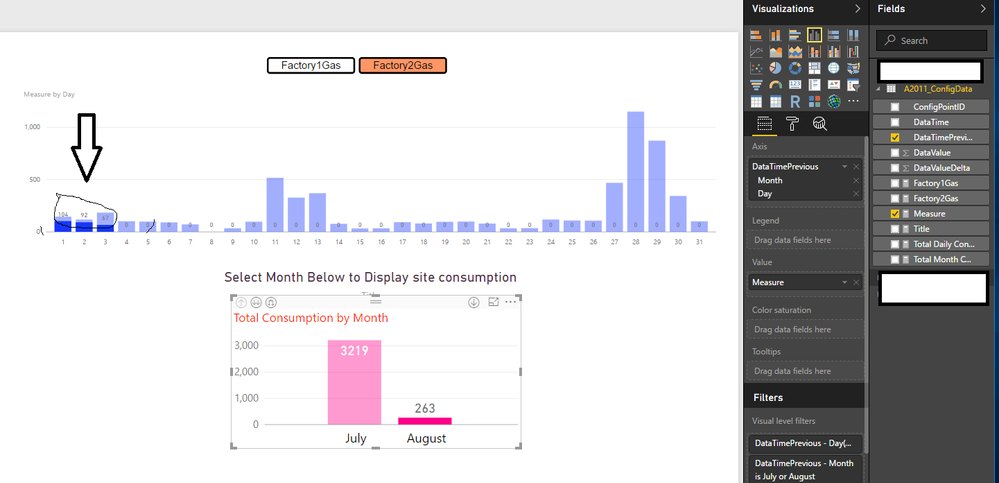
Great Thanks for helping me..The 'Measure' you created for my slicer works perfectly. . .. but I want to display this 'Measure' for specific month of the year. ie If I click on the 'Factory2Gas' and the Month of 'August', in the bar chart below, I want only data for 'August' to show in the above bar chart without the chart showing the blurred part(see arrow below). This happens when i click on specific month for either Factory1Gas or Factory2Gas.. Please Is there an edit to the Measure or anything I can do to display this accurately..
Problem2: Also the enitre graph disappear (show nothing) if I use CTRl to click both Factory1Gas and Factory2Gas together..
Hi @Anonymous,
I need to multiply the sum total of DataValueDelta with 4.11 and also with 5.0. ..How do I achieve this?? I want these values to display bar charts side by side correctly in this same bar chart.
You should be able to simply create two measures, then show both the measures as Values on the same bar chart in your scenario. The formulas below to create the measures are for your reference. ![]()
measure1 = SUM ( 'A2011_ConfigData'[DataValueDelta ] ) * 4.11
measure2 = SUM ( 'A2011_ConfigData'[DataValueDelta ] ) * 5
Regards
Hi @Anonymous,
If I understand you correctly, you should be able to use the formula below to create a new measure, and show this new created measure as Value on the chart. Then the measure will show value for either 'Factory1Gas' or 'Factory2Gas' according your selection on the Slicer. ![]()
measure =
IF (
HASONEVALUE ( 'A2011_Device'[EUA_Legend] ),
IF (
VALUES ( 'A2011_Device'[EUA_Legend] ) = "Factory1Gas",
[Factory1Gas],
[Factory2Gas]
)
)
Regards
Hi ,
Great Thanks for helping me..The 'Measure' you created for my slicer works perfectly. . .. but I want to display this 'Measure' for specific month of the year. ie If I click on the 'Factory2Gas' and the Month of 'August', in the bar chart below, I want only data for 'August' to show in the above bar chart without the chart showing the blurred part(see arrow below). This happens when i click on specific month for either Factory1Gas or Factory2Gas.. Please Is there an edit to the Measure or anything I can do to display this accurately..
Problem2: Also the enitre graph disappear (show nothing) if I use CTRl to click both Factory1Gas and Factory2Gas together..
The Power BI Data Visualization World Championships is back! Get ahead of the game and start preparing now!
| User | Count |
|---|---|
| 56 | |
| 55 | |
| 37 | |
| 18 | |
| 14 |