cancel
Showing results for 
Search instead for 
Did you mean: 

The Power BI Data Visualization World Championships is back! Get ahead of the game and start preparing now! Learn more

Reply
aurora90
New Member

Multiple conditional formating in the matrix

Hi,


I have an issue with multiple conditions and multiple conditional formating.

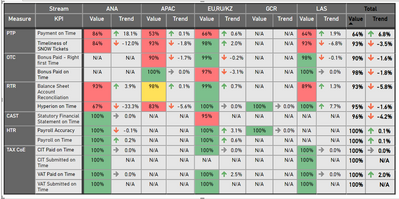
I have Matrix with KPIs - different measures and Regions. 

I would like to put here conditions:  if there a blank value appears for the KPI 'OTC' and Region "ANA" then return text "ongoing transition", but if KPI is "TAX" and Region "APAC" comment will be "not in scope for company AAAA".  And so one.

aurora90_1-1619803363819.png

Second thing is colouring, so each measure have different treshold, so I cannot put same color scale to the whole matrix. Now, I've fixed it by adding to the raw data table column with color ID. It will not work properly if I will chose for e.g. few month on the MONTH slicer. Value of KPI is a AVG measure. Trend is the difference between current and last month results.

1 ACCEPTED SOLUTION
v-deddai1-msft
Community Support
Community Support

Hi @aurora90 ,


>> if there a blank value appears for the KPI 'OTC' and Region "ANA" then return text "ongoing transition", but if KPI is "TAX" and Region "APAC" comment will be "not in scope for company AAAA".  And so one.


You need to fix it in your measure like:


Value1 = IF(MAX(Table[Measure]) = 'OTC'&&MAX(Table[Measure]) = 'ANA','ongoing transition',IF(MAX(Table[Measure]) = 'TAX'&&MAX(Table[Measure]) = 'APAC','not in scope for company AAAA',[VALUE]))


>>Second thing is colouring, so each measure have different treshold, so I cannot put same color scale to the whole matrix. Now, I've fixed it by adding to the raw data table column with color ID. 


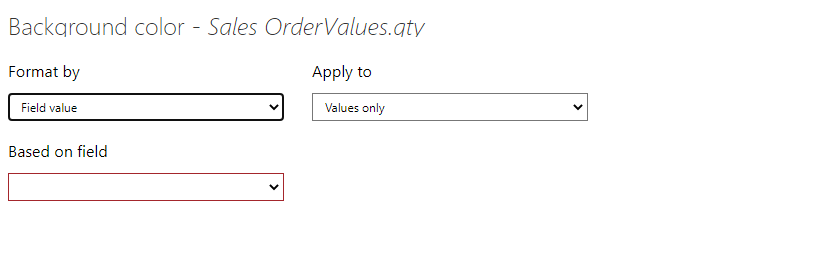
You need to create a measure for your background color conditional format:


Capture2.PNG


Please refer to https://docs.microsoft.com/en-us/power-bi/create-reports/desktop-conditional-table-formatting


If this post helps, then please consider Accept it as the solution to help the other members find it more quickly.


Best Regards,

Dedmon Dai


View solution in original post

2 REPLIES 2
v-deddai1-msft
Community Support
Community Support

Hi @aurora90 ,


>> if there a blank value appears for the KPI 'OTC' and Region "ANA" then return text "ongoing transition", but if KPI is "TAX" and Region "APAC" comment will be "not in scope for company AAAA".  And so one.


You need to fix it in your measure like:


Value1 = IF(MAX(Table[Measure]) = 'OTC'&&MAX(Table[Measure]) = 'ANA','ongoing transition',IF(MAX(Table[Measure]) = 'TAX'&&MAX(Table[Measure]) = 'APAC','not in scope for company AAAA',[VALUE]))


>>Second thing is colouring, so each measure have different treshold, so I cannot put same color scale to the whole matrix. Now, I've fixed it by adding to the raw data table column with color ID. 


You need to create a measure for your background color conditional format:


Capture2.PNG


Please refer to https://docs.microsoft.com/en-us/power-bi/create-reports/desktop-conditional-table-formatting


If this post helps, then please consider Accept it as the solution to help the other members find it more quickly.


Best Regards,

Dedmon Dai


collinq
Super User
Super User

hi @aurora90 ,


I don't believe that you can format the text in a matrix to do conditional formatting output.  Unless you make a measure for each field that does what you want and put that measure into the value instead.


But, you can do the color and other items for the fields in the "value" section.  

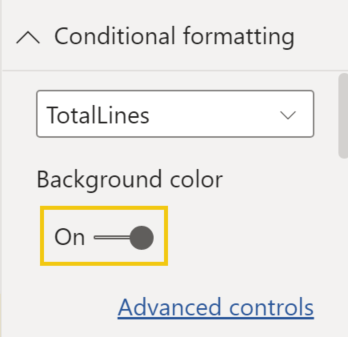
In the matrix, select "Conditional Formatting" and then you can modify the various attributes in there.

collinq_0-1619904909525.png


Did I answer your question? Mark my post as a solution!

Proud to be a Datanaut!
Private message me for consulting or training needs.


Helpful resources

Announcements
Power BI DataViz World Championships

Power BI Dataviz World Championships

The Power BI Data Visualization World Championships is back! Get ahead of the game and start preparing now!

December 2025 Power BI Update Carousel

Power BI Monthly Update - December 2025

Check out the December 2025 Power BI Holiday Recap!

FabCon Atlanta 2026 carousel

FabCon Atlanta 2026

Join us at FabCon Atlanta, March 16-20, for the ultimate Fabric, Power BI, AI and SQL community-led event. Save $200 with code FABCOMM.